
How to Make an Invoice: A Simple Step by Step Guide
The first time you have to send a client a bill, it feels bigger than it is. You stare at a blank…
Read articleA step-by-step guide to shorten a URL and track clicks for free, with a custom alias, a 7-day click chart, and links that can expire.

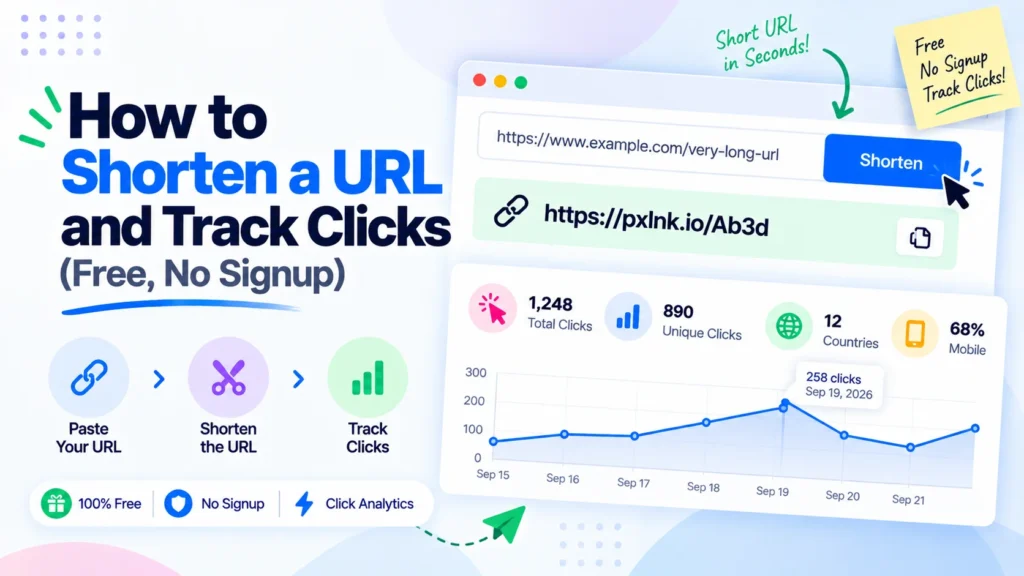
You paste a link into a chat, and it sprawls across three lines with a tail of tracking junk. Worse, once you send it you have no idea if anyone clicked. Learning how to shorten a URL and track clicks fixes both problems at once, and you do not need a paid plan to do it. This walkthrough uses the free Pixellize URL shortener, and every step below has a real screenshot from the tool.
To shorten a URL and track clicks, paste your long link into a shortener, choose a lifetime, and click Shorten to get a short link. Share that link, then open the tracker and paste it back to see total clicks, referrers, and devices. The whole process takes about 10 seconds and needs no account.
| What you want | How Pixellize handles it |
|---|---|
| A shorter link | One click, random code or custom alias |
| Track clicks | Built-in, no login, 7-day chart |
| Where clicks came from | Top referrers plus device breakdown |
| Temporary link | Expires in 24h, 2 days, or 5 days |
| Cost | Free, no signup, 5 links per day |
Open the Pixellize URL shortener and paste your long link into the box. Pick how long it should last from the dropdown: 24 hours, 2 days, or 5 days. If you want a link people can actually read, type a custom alias like summer-sale. Leave the alias blank and Pixellize gives you a random short code instead.
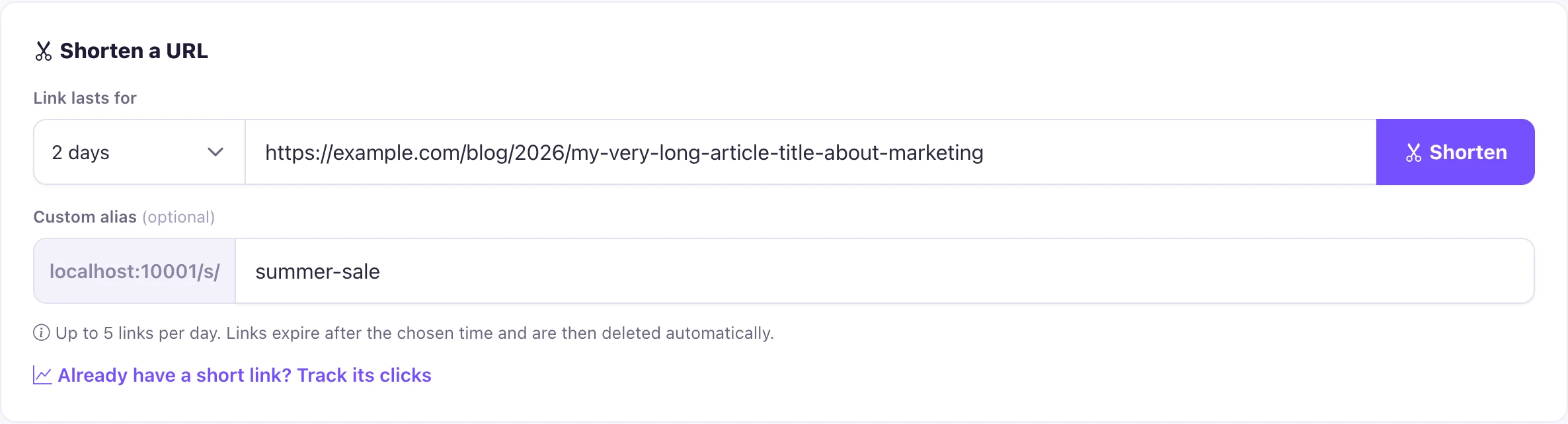
Click Shorten and the link is ready right away. Hit Copy to grab it. You will also see the expiry countdown and a live click counter that starts at zero. Here is the thing most people miss: this counter keeps updating every time someone opens your link, so you do not have to set up anything extra to start tracking.

When you want to check performance, open the tracker on the same page and paste your short link. Pixellize shows total clicks, a 7-day bar chart, your top referrers, and the device split across mobile, tablet, and desktop. The first time I shared a link on two channels, the referrer list told me within an hour which one actually drove clicks.
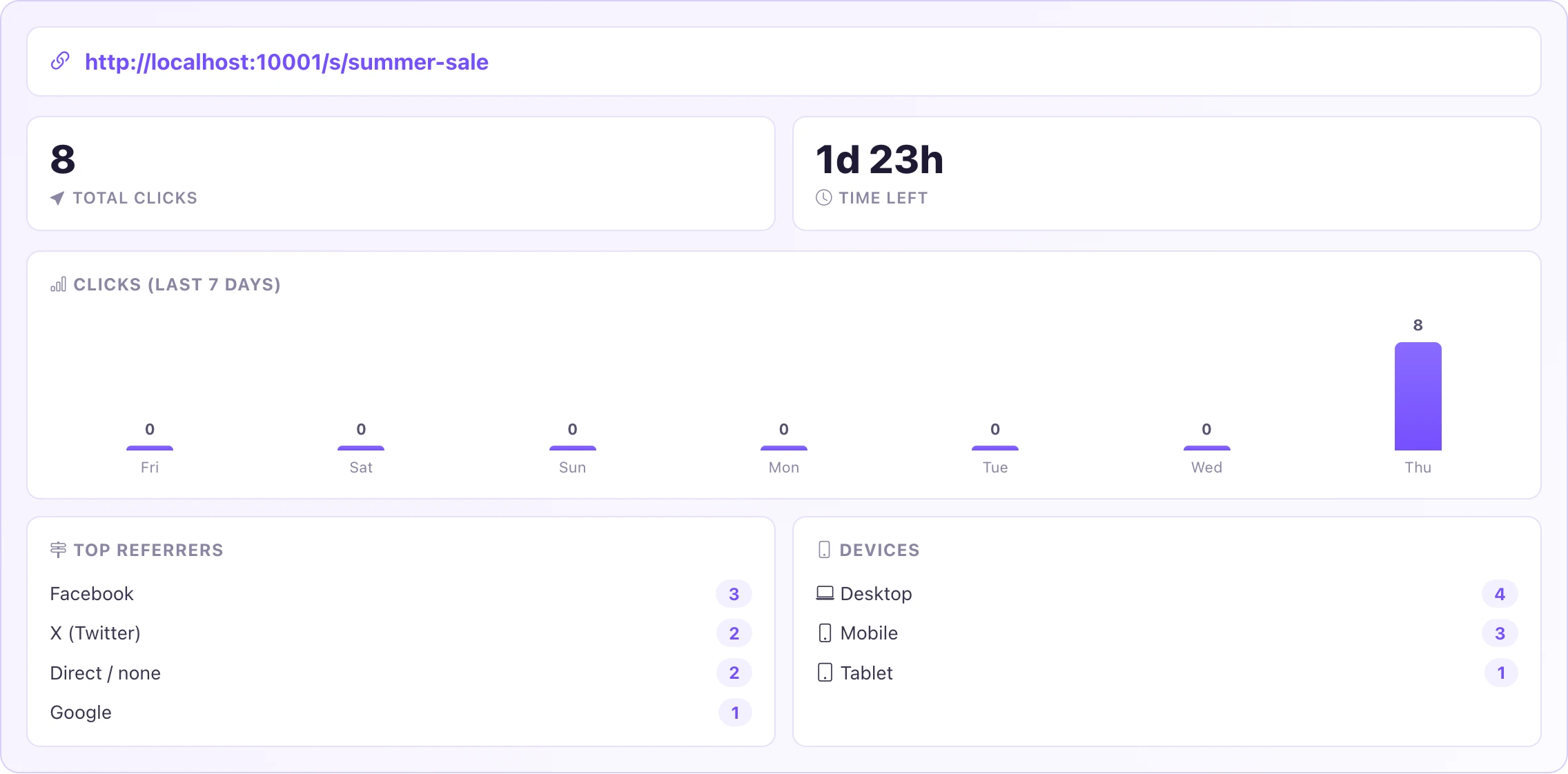
Click tracking works by counting each visit to your short link and recording three light details: the time, the referring website, and the device type. Pixellize then groups those into a 7-day chart, a referrer list, and a device split. It stores no IP addresses and no personal profiles, so you get the numbers without tracking the people behind them.
Referrers are cleaned up too. Traffic from l.facebook.com and m.facebook.com is grouped under one label, so your top-referrer list reads like real sources instead of raw subdomains. That small detail makes it much easier to see whether a post on social, a newsletter, or direct shares brought the clicks.
A random code works, but a custom alias is easier to trust and remember. With Pixellize you can set your own back-half, for example a link ending in /s/resume or /s/webinar, using 3 to 20 letters, numbers, hyphens, or underscores. If the alias is already taken, the tool asks for another one.
Expiry is the other half. Pick 24 hours, 2 days, or 5 days when you create the link. After that window the link stops working and deletes itself. Keep in mind this is perfect for a flash sale or a one-off file share, but not for a permanent link you plan to reuse for years. For anything permanent, a longer-lived service fits better.
A free URL shortener is safe to use when the tool screens destinations and does not track you. Shortened links can hide where they lead, which is why phishing campaigns abuse them, according to the US Cybersecurity and Infrastructure Security Agency. Pixellize checks every destination against Google Safe Browsing before it makes a link.
That check blocks known malware and phishing pages at creation time, so a bad link never gets a short URL. On top of that, Pixellize marks its short links so search engines do not index them, and it caps creation at 5 links a day per person to keep bots out. You still want to be careful opening short links from strangers, but the tool itself is built to stay clean.
Shortening a URL is not only about tidiness. A short, readable link earns more clicks because people can see where it goes and trust it. Long links with tracking parameters look suspicious and often get cut off in messages, which quietly costs you traffic. A clean link like a Pixellize short URL travels well across email, chat, printed flyers, and social bios.
Tracking is the second reason, and it is the one most free tools charge for. Without click data you are guessing. Did that newsletter drive visits, or was it the post you shared on social? The referrer list answers that in seconds. The device split tells you whether to design your landing page for phones or desktops. According to Wikipedia’s overview of URL shortening, the technique has been around since 2002, and click measurement is exactly why marketers adopted it so widely.
Here is a simple rule. If you are sharing a link anywhere you cannot see analytics natively, shorten it first with Pixellize. You lose nothing, the link still points to the same page, and you gain a running count of clicks, sources, and devices. For a campaign with several links, that feedback loop is the difference between guessing and knowing.
Once you know how to shorten a URL and track clicks, you get cleaner links and real feedback on what works, all without an account. Pixellize keeps it free and private, and pairs nicely with the rest of the toolkit like the SEO tools and image tools when you are prepping content to share.
Free, no signup, with a custom alias, click analytics, and expiring links.
Open the URL ShortenerPaste your long link into a free URL shortener like Pixellize, choose how long it should last, and click Shorten. You get a short link instantly with no signup, no email, and no credit card. Pixellize allows up to 5 links per day per person.
Yes. Every Pixellize short link has built-in click tracking with a 7-day chart, top referrers, and a device breakdown across mobile, tablet, and desktop. Paste the short link into the tracker to see the numbers, with no login required.
Yes. You can set a custom alias so the link ends in something readable like /s/my-brand, using 3 to 20 letters, numbers, hyphens, or underscores. If the alias is already taken, the tool asks you to pick another one.
With Pixellize you choose 24 hours, 2 days, or up to 5 days when you create the link. After it expires the link stops working and is deleted automatically, which is useful for temporary or time-sensitive shares.
Short links can hide their destination, so open ones from people you trust. Pixellize checks every destination against Google Safe Browsing before creating a link, which blocks known malware and phishing pages, but caution still matters with links from strangers.
A short link is a redirect, so it passes visitors to the real page without hurting it. Pixellize marks its short links as noindex so they never compete with your real pages in search results, keeping your SEO clean.
Founder and CEO of Pixellize.io, building AI-powered web tools and digital products with a focus on user experience and automation. M.Sc. Zoology, working at the intersection of technology, data analytics, and life sciences.