
Right-click a video on X and you get nothing useful. No “save video as”, no download button, just an option to copy the post link. That gap is exactly why “how to download a twitter video” is such a common search. The good news is simple: a public X post link is all you need. Paste it into the free Pixellize Twitter video downloader and you get a clean MP4 back, with no app and no account.
Below is the fast method, plus the parts most tutorials skip: private videos, GIFs that quietly save as MP4, phone steps, and why a download sometimes fails.
- Copy a public X (Twitter) post link, paste it into Pixellize, pick HD or SD, and the MP4 saves to your device.
- It works the same on a phone or a computer, with no app and no sign-up.
- Private, protected, and deleted posts cannot be downloaded. That is a login wall on X, not a tool limit.
- Twitter GIFs are really MP4 files, so they save as .mp4, not .gif.
- The file comes straight from X’s servers, so there is no added watermark.
| Post type | Can you download it? |
|---|---|
| Public post with a native video | Yes, HD and SD MP4 |
| Public post with a GIF | Yes, saved as MP4 |
| Private or protected account | No, login wall |
| Deleted or age-restricted post | No |
| A link to an embedded YouTube clip | No, it is not an X video |
How do I download a Twitter video?
Copy the link to the public X post, paste it into a downloader like Pixellize, and pick a quality. In about 3 steps you get a clean MP4 saved to your device. There is no sign-up, no app install, and no watermark, because the file comes straight from X’s own servers rather than a re-encoded copy.
How to download a Twitter video step by step
The whole thing takes under a minute. Here is each step with the Pixellize screen you will see.
Step 1: Copy the X post link and open the tool
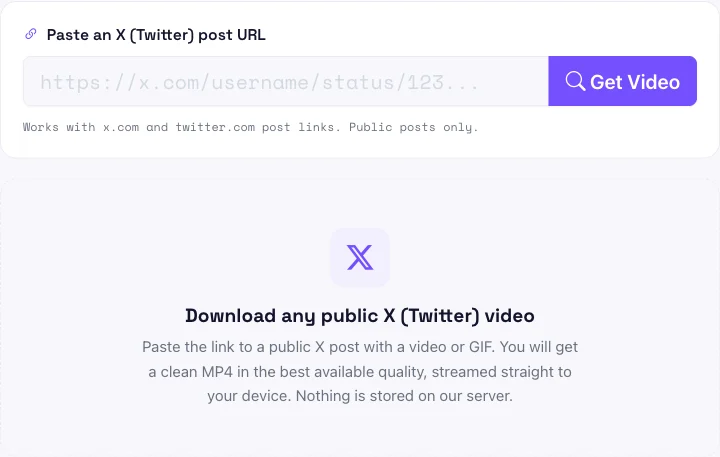
On X, tap the share icon under the video and choose Copy link, or just copy the URL from your browser’s address bar. Then open the Pixellize Twitter video downloader. You will see a single box waiting for the link.
Step 2: Paste the link and press Get Video
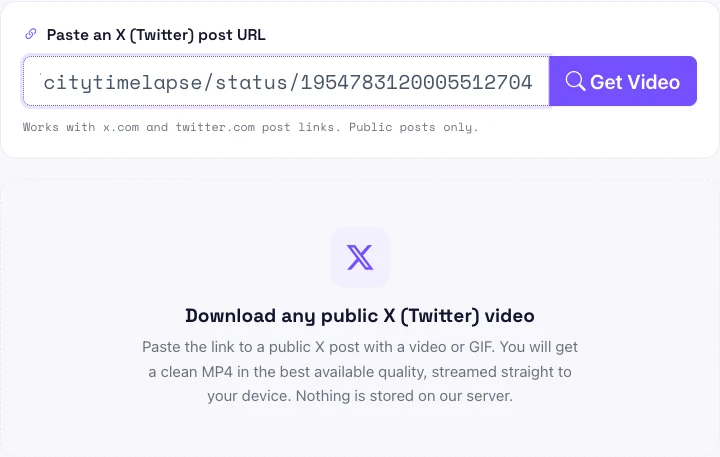
Paste the link into the box and click Get Video. Pixellize reads the post and pulls the video that X stored, usually in a second or two. Both x.com and twitter.com links work, so an older bookmarked link is fine.
Step 3: Pick HD or SD and download
You get a preview with the author, length, and resolution, plus two buttons. Choose HD for the best copy X kept, or SD for a smaller file, and the MP4 downloads straight to your device. Nothing is stored on Pixellize after the download starts.

The first time I needed a clip off X, I tried screen recording it. The result was shaky, half the resolution, and had my notification bar in the frame. Pasting the link instead took ten seconds and gave me the real file.
Can you download private Twitter videos?
No. Private and protected X accounts sit behind a login wall, so no downloader can reach their videos without being signed in as an approved follower. Deleted and age-restricted posts fail for the same reason. Pixellize works only on public posts that anyone can open without an account.
This is worth understanding. When a download fails, it is almost never a broken tool. It is X saying the post is not public. A quick test: if you can open the post in a private browser window without logging in, a downloader can read it too.
Download Twitter videos on iPhone and Android
The steps are identical on a phone, because Pixellize runs in the browser. Open the X app, tap the share arrow under the post, and choose Copy link. Switch to your browser, open Pixellize, paste, and tap Get Video.
On iPhone the MP4 lands in the Files app or your Downloads, and you can move it into Photos from there. On Android it usually drops straight into your Downloads folder or Gallery. If you also grab clips from other networks, the same paste-and-download flow powers the Pixellize Facebook video downloader and the Instagram profile picture downloader.
Why a Twitter GIF downloads as an MP4
Here is the thing most guides miss. X does not actually store GIFs. When you post a GIF, it is converted to a small looping MP4 video, a trick Twitter adopted back in 2014 to save bandwidth (TechCrunch, 2014). So when you download a GIF from a post, Pixellize hands you the real file: an .mp4, not a .gif.
That is usually what you want. MP4 plays everywhere, is far smaller than a true GIF, and keeps smoother motion. If you specifically need an animated .gif, save the MP4 first, then run it through a separate video-to-GIF converter.
Is it legal to download Twitter videos?
Downloading a public X video for personal use, like saving a clip to watch offline, is generally fine. Reposting someone else’s video as your own, or using it commercially, can breach copyright and X’s terms. The video still belongs to whoever made it, so credit the creator or ask permission when you are unsure.
X’s own rules explain how its video works and what you are allowed to post (X Help Center). The download step is on you to use responsibly.
Will downloading reduce the video quality?
No, not when you pick HD. Pixellize pulls the exact MP4 variant X stored, so the HD option matches the highest resolution the post was served at, often 720p or 1080p. The SD button only exists for a smaller file on slow connections. Neither option re-compresses the clip, so there is no extra quality loss.
One caveat worth knowing. X compresses every upload, so a clip that looks like 1080p on X is already lighter than the uploader’s original camera file. A downloader can only give you the version X kept, never a sharper copy than the post itself holds. If the HD button shows a low resolution, that is the limit of the source, not the tool.
Common reasons a Twitter video will not download
If Get Video returns an error, one of these is almost always the cause:
- The post is private or protected. Only public posts can be read.
- The post was deleted or is age-restricted, so X will not serve it.
- There is no video in the post. A text or image-only post has nothing to pull.
- You pasted a profile or search link instead of a single post link that ends in /status/.
- The clip is embedded from another site such as a YouTube link, which is not an X-hosted file.
Fix the link or confirm the post is public, and the download works on the next try.
Paste the post link, pick HD or SD, and get a clean MP4, free with no app or watermark.
Open the Twitter Video DownloaderSave your next clip
Once you know the trick, how to download a Twitter video stops being a chore. Copy the public post link, paste it into Pixellize, and pick HD or SD. Keep the Twitter video downloader handy for the next clip you want to save, and if you work with threads rather than video, the Twitter thread to PDF guide covers that case.
Frequently Asked Questions
Can I download a Twitter video without an account?
Yes. Pixellize works on public X posts without any login, app, or sign-up. Paste the post link, press Get Video, and save the MP4. You only hit a wall on private or protected accounts, which need you to be a signed-in follower.
How do I download a Twitter video on my phone?
Copy the post link from the X app share menu, open your mobile browser, go to Pixellize, paste the link, and tap Get Video. On iPhone the MP4 saves to Files, and on Android it drops into Downloads or your Gallery.
Can you download private or protected Twitter videos?
No. Private and protected accounts are behind a login wall, so no public tool can reach their videos. Deleted and age-restricted posts also fail. Only public posts that anyone can open without signing in will download.
Do downloaded Twitter videos have a watermark?
No. The MP4 comes straight from X's own servers, so it is the original file with no added logo, banner, or stamp. Pixellize does not re-encode it or brand it in any way.
Can I download a Twitter GIF?
Yes, but it saves as an MP4. X stores posted GIFs as small looping MP4 videos rather than true .gif files, so the download is a .mp4. If you need an animated GIF, convert the MP4 afterward.
What video quality can I download?
You can download up to the original quality X kept, usually offered as an HD option plus a smaller SD copy. The resolution shown, such as 1280 by 720, is the best variant X stored for that post.
Is it legal to download a Twitter video?
Saving a public video for personal, offline use is generally fine. Reposting it as your own or using it commercially can breach copyright and X's terms, so credit the creator or get permission first.

Simranjit Kaur
Founder and CEO of Pixellize.io, building AI-powered web tools and digital products with a focus on user experience and automation. M.Sc. Zoology, working at the intersection of technology, data analytics, and life sciences.