
How to Find Broken Images on a Website (Free Checker)
A broken image is one of those faults you stop seeing on your own site. The gray placeholder box, the missing product…
Read articleFour free ways to check image alt text on any page or site, from a quick right-click to a full-site scan, so you catch missing and empty tags for SEO and accessibility.

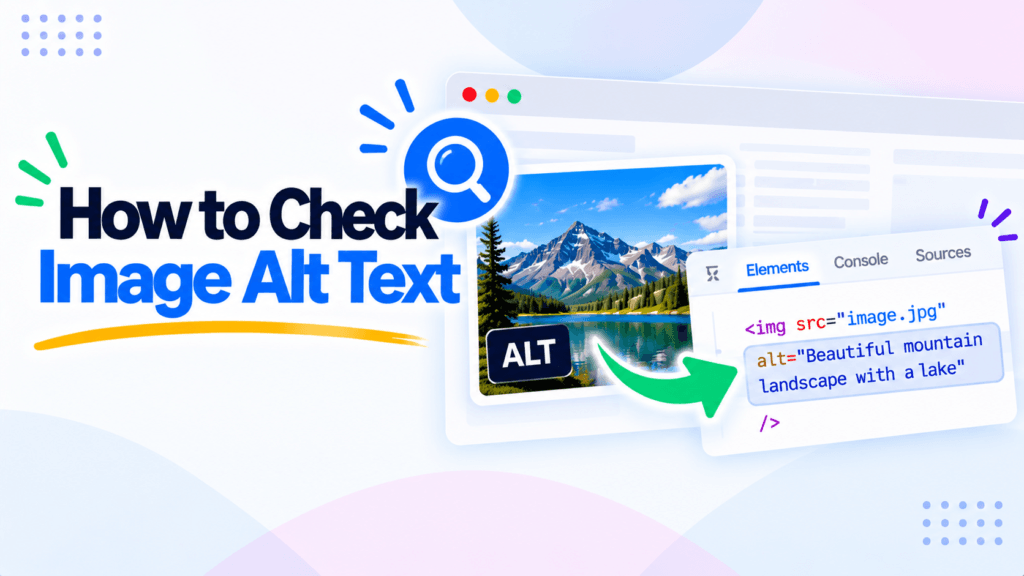
You added a dozen images to a page and moved on. Months later a client asks why the site fails an accessibility audit, and the answer is sitting in the HTML: half the images have no alt attribute at all. Learning how to check image alt text takes two minutes and saves that conversation. This guide shows four free ways to do it, from a quick right-click to a full-site scan with the free Image Alt Checker from Pixellize, plus how to read the results and write alt text that actually helps.
<img> tag carries for screen readers and search engines. Missing it hurts both.alt= value. For a whole page or site: use an online checker.alt="") is not always a bug. It is correct for purely decorative images.alt="IMG_2043.jpg" counts as present but is useless. Checkers flag it as okay, so read the values yourself.Alt text (the alt attribute on an <img> tag) is a short written description of an image. Screen readers read it aloud to people who cannot see the picture, and search engines use it to understand what the image shows. If you want the full background, we wrote a separate piece on what alt text is and why it matters. This guide is about the checking part.
Why bother auditing it? Missing alternative text is one of the most common accessibility failures found every year by the WebAIM Million report (an annual scan of the top million home pages, retrieved October 2026). On the SEO side, an image with good alt text can rank in Google Images and adds relevance to the page it sits on. Both benefits need one thing: the alt attribute has to actually be there, and it has to say something useful.
To check if an image has alt text, right-click the image, choose Inspect, and read the alt= value inside the highlighted <img> tag. That handles one image in about five seconds. For a whole page or an entire site, paste the URL into an online alt text checker and it lists every image and flags the ones with missing or empty alt.
The fastest check for one image needs no tool at all. Right-click the image in Chrome, Edge, or Firefox and choose Inspect (or Inspect Element). The browser opens its developer panel with that image’s <img> tag already highlighted. Read the alt attribute: text inside the quotes means alt is present, alt="" means it is empty, and no alt attribute at all means it is missing.
Keep in mind this checks one image on one page. It is perfect for a spot check, like confirming your hero image got its alt after an edit. It does not scale to a 40-image gallery, which is where the later methods earn their keep.
To see every image on a page at once, view the raw HTML. Right-click an empty part of the page and choose View Page Source, or press Ctrl+U (Cmd+Option+U on a Mac). Then press Ctrl+F and search for <img to jump between image tags and scan their alt values.
Here’s the catch. Page source shows the HTML the server first sent, not what JavaScript added afterward. On a site that loads images with a slider or lazy-loads them as you scroll, some <img> tags will not appear in View Source at all. DevTools (Method 1) and a proper crawler see the rendered page, so they catch those. View Source is quick but incomplete on modern sites.
Accessibility extensions turn the check into one click. WAVE from WebAIM (free for Chrome and Firefox) overlays icons on the live page: a red icon marks a missing alt, a green one marks a present alt, and it tallies the errors in a sidebar. It also catches other accessibility issues, so it is a good habit for anyone building pages.
The tradeoff is scope. An extension checks the page you are currently looking at, one at a time. To audit every page on a site you would have to open each one and run it again, which gets old fast past a handful of pages.
When you need the whole site, not one image, use a crawler. Paste a URL into the Pixellize Image Alt Checker, pick a single page or the whole website (up to 100 pages), and it lists every image with a thumbnail, its alt text, and a status badge: missing, empty, or present. You can filter to show only the problems and export the list as CSV or JSON to work through. Nothing is uploaded or stored.
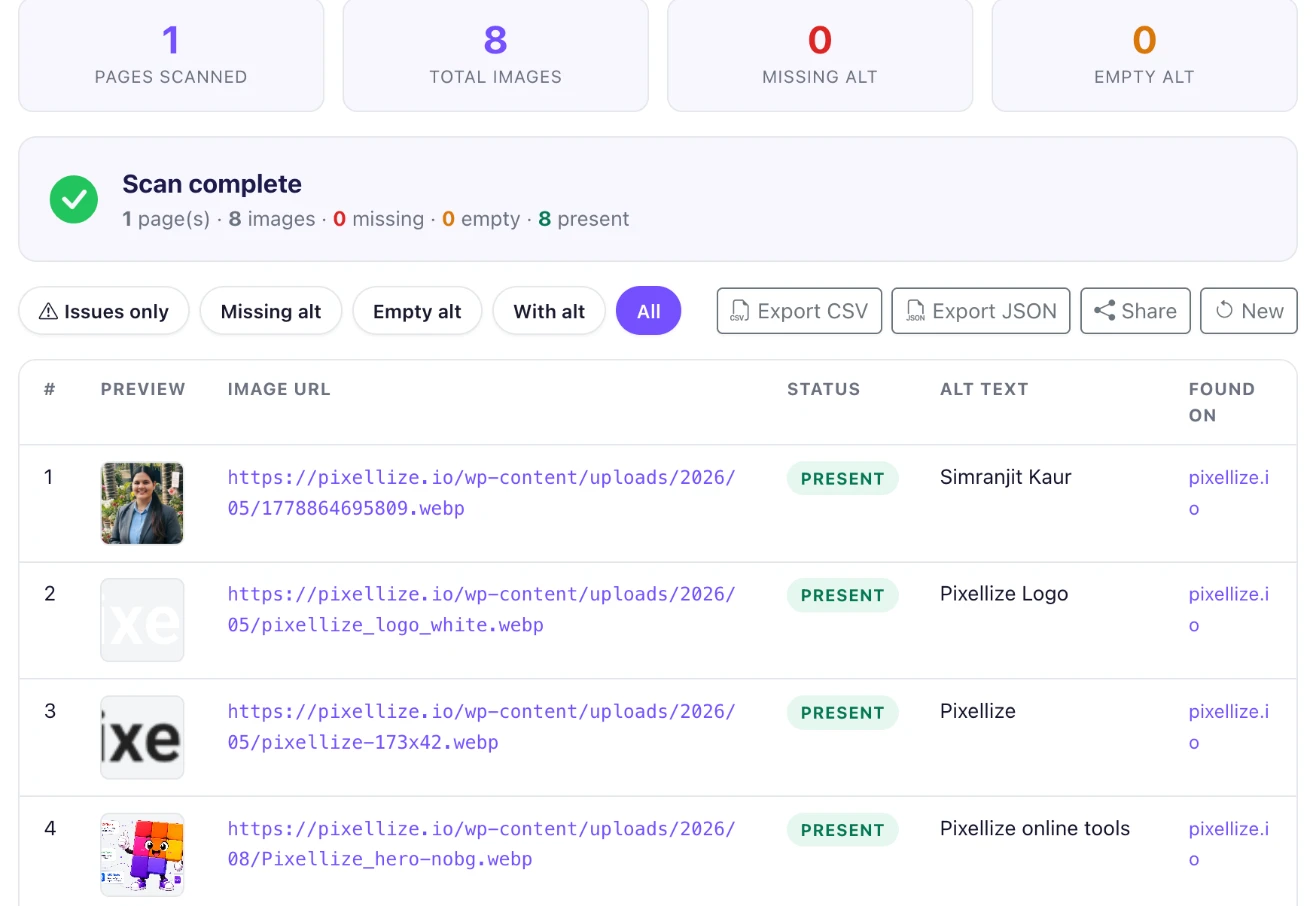
To show what a clean result looks like, we ran the tool on the Pixellize home page: it found 8 images, with 0 missing and 0 empty alts, every one marked present. On a typical blog the first scan is rarely that tidy, and the filtered “missing” view plus the CSV export is what turns a vague “fix the alt text” task into a concrete checklist you can hand to anyone.
| Method | Best for | Sees JS-loaded images? | Scales to a whole site? |
|---|---|---|---|
| DevTools Inspect | One image, fast spot check | Yes | No |
| View Page Source | All images on one page | No | No |
| WAVE extension | One page + other a11y issues | Yes | No |
| Online checker (Pixellize) | A page or a whole site, with export | Yes | Yes, up to 100 pages |
Missing alt text means the <img> tag has no alt attribute at all, which is a real bug for both SEO and screen readers. Empty alt text means alt="" is present but blank, and that is sometimes exactly right: it tells a screen reader to skip a purely decorative image, like a spacer or a background flourish.
This is the part most “fix your alt text” advice gets wrong. Not every empty alt is an error to fill in. A decorative divider line should have alt="" so assistive tech ignores it, while a product photo or a chart must have a real description. The job of a checker is to surface both missing and empty so you can decide, image by image, which empties are intentional and which are lazy. The W3C’s alt decision tree (retrieved October 2026) is the reference for calling it.
Finding the gaps is half the job. Writing something useful in them is the other half. Good alt text describes the content and function of the image in plain language, usually under about 125 characters, without the words “image of” (the screen reader already says it is an image). Match the description to why the image is on the page.
| Image | Weak alt | Good alt |
|---|---|---|
| Running shoe product photo | shoe | Blue Nike Pegasus running shoe, side view |
| Bar chart of 2026 sales | chart.png | Bar chart showing 2026 sales up 32 percent over 2025 |
| Decorative page divider | divider line graphic | (leave empty: alt=””) |
The first time I audited a client site, a third of the images had their filename as the alt text, things like alt="DSC_0041.jpg". Every checker marked them present, so a quick pass looked clean. They were useless to a screen reader and to Google. The lesson: presence is not quality. Read a sample of the “present” values, not only the missing count.
alt="banner-final-2.png" describes nothing.alt="" is correct.Find missing and empty alt text across a page or your whole site, free, with CSV export. Nothing uploaded.
Open the Image Alt CheckerNow you know how to check image alt text four ways: Inspect for one image, View Source for a page, a WAVE extension for a page with context, and the Pixellize Image Alt Checker for a whole site with an exportable list. Pick the one that fits the job, read a few of the present values to be sure they are real, and leave decorative images empty on purpose. Run the Image Alt Checker on your site today, and you will know exactly which images need words. That, in short, is how to check image alt text, from a single tag to a full-site report.
Right-click the image and choose Inspect, then read the alt value in the highlighted img tag. Text in the quotes means alt is present, alt="" is empty, and no alt attribute means it is missing. For a whole page, use an online alt text checker.
Use a crawler, not a manual check. Paste your URL into the Pixellize Image Alt Checker, choose whole website, and it scans up to 100 pages and lists every image with a missing, empty, or present badge. Filter to missing and export the list as CSV.
Not always. An empty alt is correct for purely decorative images like spacers or background flourishes, because it tells screen readers to skip them. It is only a problem when a meaningful image, such as a photo or chart, is left with alt="".
Yes. Alt text helps Google understand an image, which can earn rankings in Google Images and adds topical relevance to the page. It is also an accessibility requirement, so good alt text serves both search engines and screen reader users at once.
Keep it concise, usually under about 125 characters, because some screen readers cut off longer descriptions. Describe the content and function of the image in plain language, skip "image of", and do not stuff keywords.
Yes. Browser DevTools, View Source, and the WAVE extension are all free, and the Pixellize Image Alt Checker scans a page or a whole site free with no signup and CSV export. Nothing is uploaded or stored.
Founder and CEO of Pixellize.io, building AI-powered web tools and digital products with a focus on user experience and automation. M.Sc. Zoology, working at the intersection of technology, data analytics, and life sciences.