
YouTube Dislike Viewer & Checker: See Hidden Dislikes 2026
YouTube hid public dislike counts in 2021. A youtube dislike viewer brings them back as community estimates. Here is how to use…
Read article
Learning how to download a YouTube video thumbnail looks like it needs a paid app, but it really doesn’t. Every public YouTube video has four to five thumbnail images sitting at predictable URLs, free to grab. YouTube does not put a download button on the player, but the files have been served at the same img.youtube.com path since 2014. Most thumbnail downloader sites are just thin wrappers around that URL pattern, charging your attention to click an ad before showing you what you could have typed yourself.
Whether you’re a content creator studying competitor thumbnails, a designer building a research collection, or a marketer recreating a viral style, this guide shows you five practical methods to download a YouTube video thumbnail. From a one-paste tool to the direct URL pattern that needs zero software, plus the six things that can go wrong and the fix for each.
| Resolution name | Dimensions | URL pattern (replace VIDEO_ID) | Always available? |
|---|---|---|---|
| maxresdefault (HD) | 1280×720 | img.youtube.com/vi/VIDEO_ID/maxresdefault.jpg | Only if creator uploaded a custom HD thumbnail |
| sddefault (SD) | 640×480 | img.youtube.com/vi/VIDEO_ID/sddefault.jpg | Yes |
| hqdefault (HQ) | 480×360 | img.youtube.com/vi/VIDEO_ID/hqdefault.jpg | Yes |
| mqdefault (Medium) | 320×180 | img.youtube.com/vi/VIDEO_ID/mqdefault.jpg | Yes |
| default (Low) | 120×90 | img.youtube.com/vi/VIDEO_ID/default.jpg | Yes (used in playlist UI) |
VIDEO_ID with the 11-character ID from any YouTube URL and you have a direct image download link.Before the power-user methods, here are the three ways most people actually need. Pick by whose video it is and which device you are on.
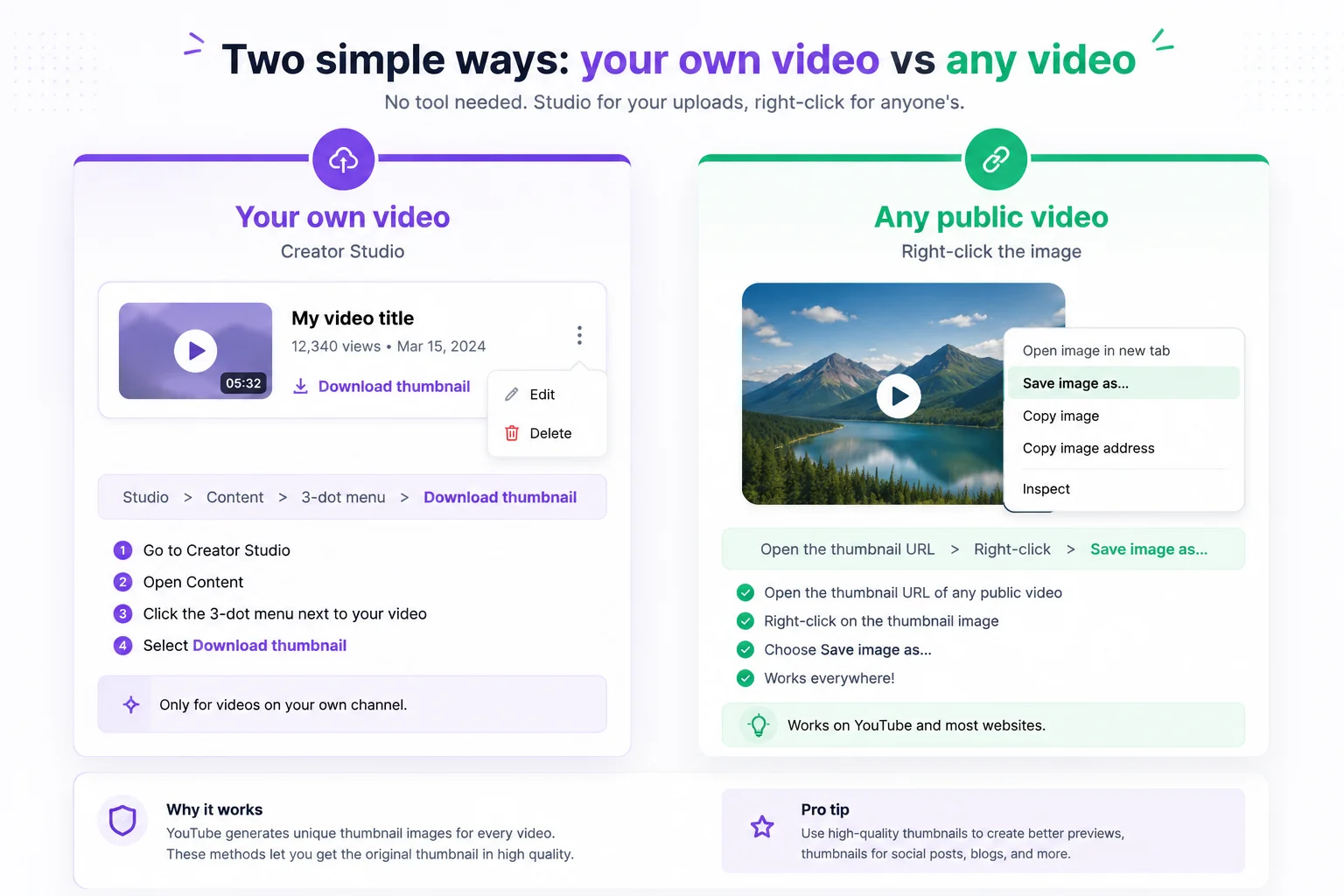
If it is your upload, YouTube hands you the file directly. Open YouTube Studio, go to Content, hover the video, click the three-dot menu, and choose Download thumbnail. You get the exact image you uploaded at full resolution, no tool needed.
For someone else’s video, open the thumbnail image in your browser using the direct URL shown below, then right-click the image and choose Save image as. This is the fastest one-off method on a desktop and works in every browser.
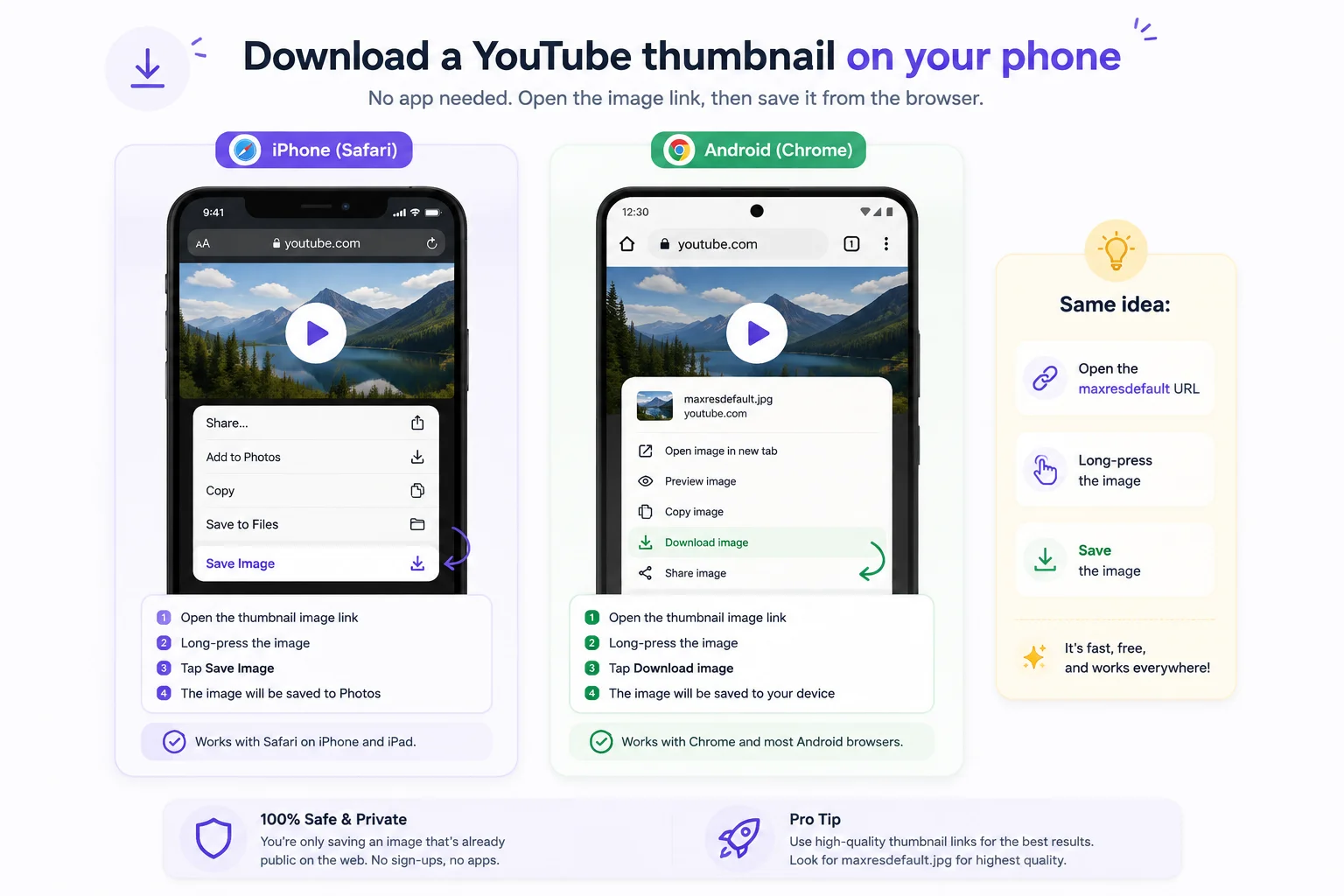
No app required. Open the thumbnail’s direct image URL in your phone browser, then long-press the image. On iPhone Safari tap Save to Photos, and on Android Chrome tap Download image. The same maxresdefault link covered below works on mobile too.
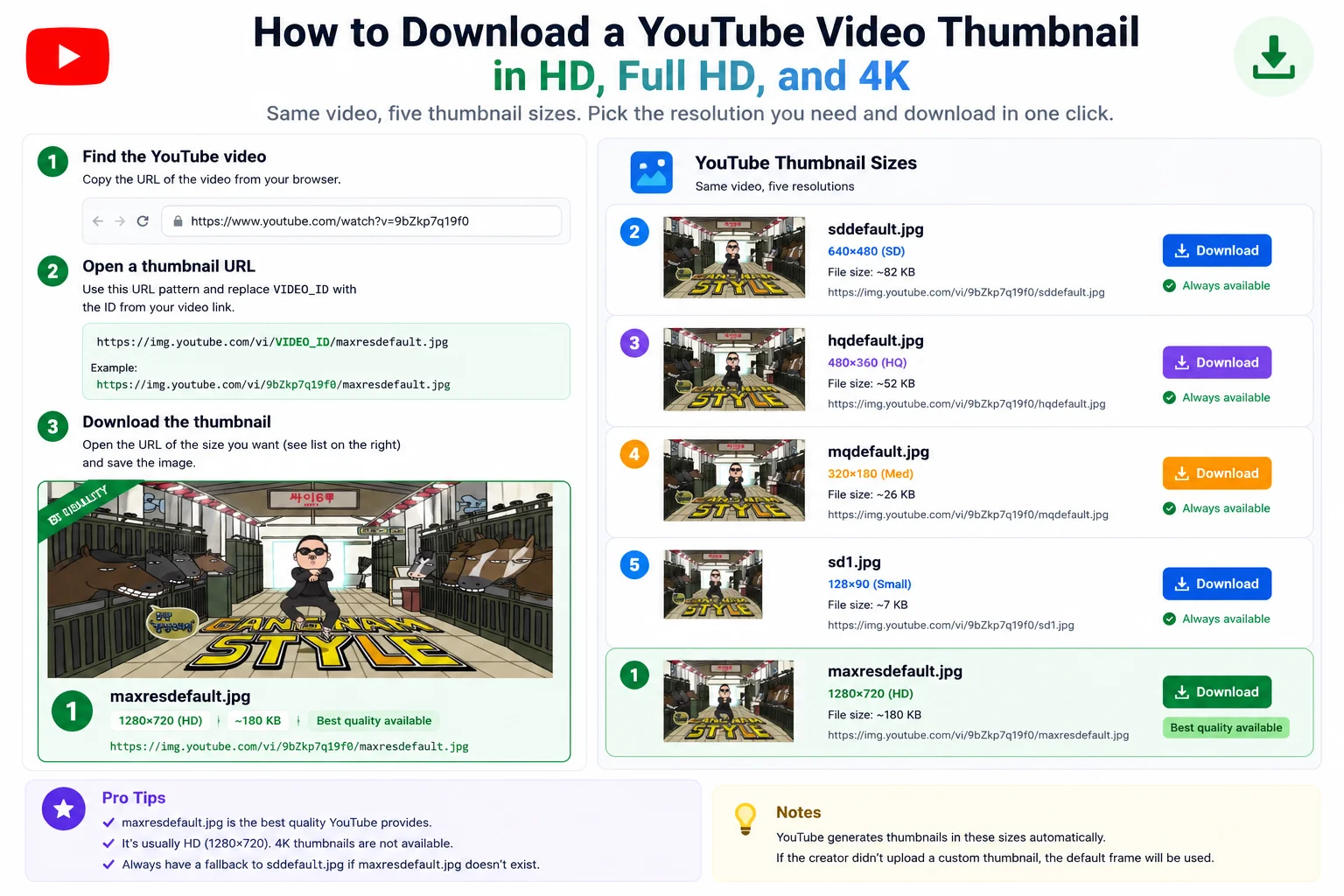
Think of YouTube’s thumbnail URLs like postal addresses: every video lives at exactly the same set of paths under img.youtube.com/vi/<VIDEO_ID>/, with the filename telling you which size you get. The five files YouTube generates for every public video:
YouTube announced 4K (3840×2160) thumbnail support in 2024 for TV-optimized displays, but the publicly downloadable thumbnail still tops out at 1280×720 for most videos. The “4K download” label some thumbnail downloaders use refers to upscaling, not native 4K from YouTube’s CDN. As of 2026, that still holds: the public CDN tops out at 1280×720. A truly native 4K thumbnail download requires the official YouTube Data API.
Did you know the average thumbnail downloader site loads 14 third-party scripts before showing you a download link? Five practical methods below, ordered roughly from fastest-for-one-off-grabs to most-powerful-for-bulk-work. Pick the one that fits your use case.
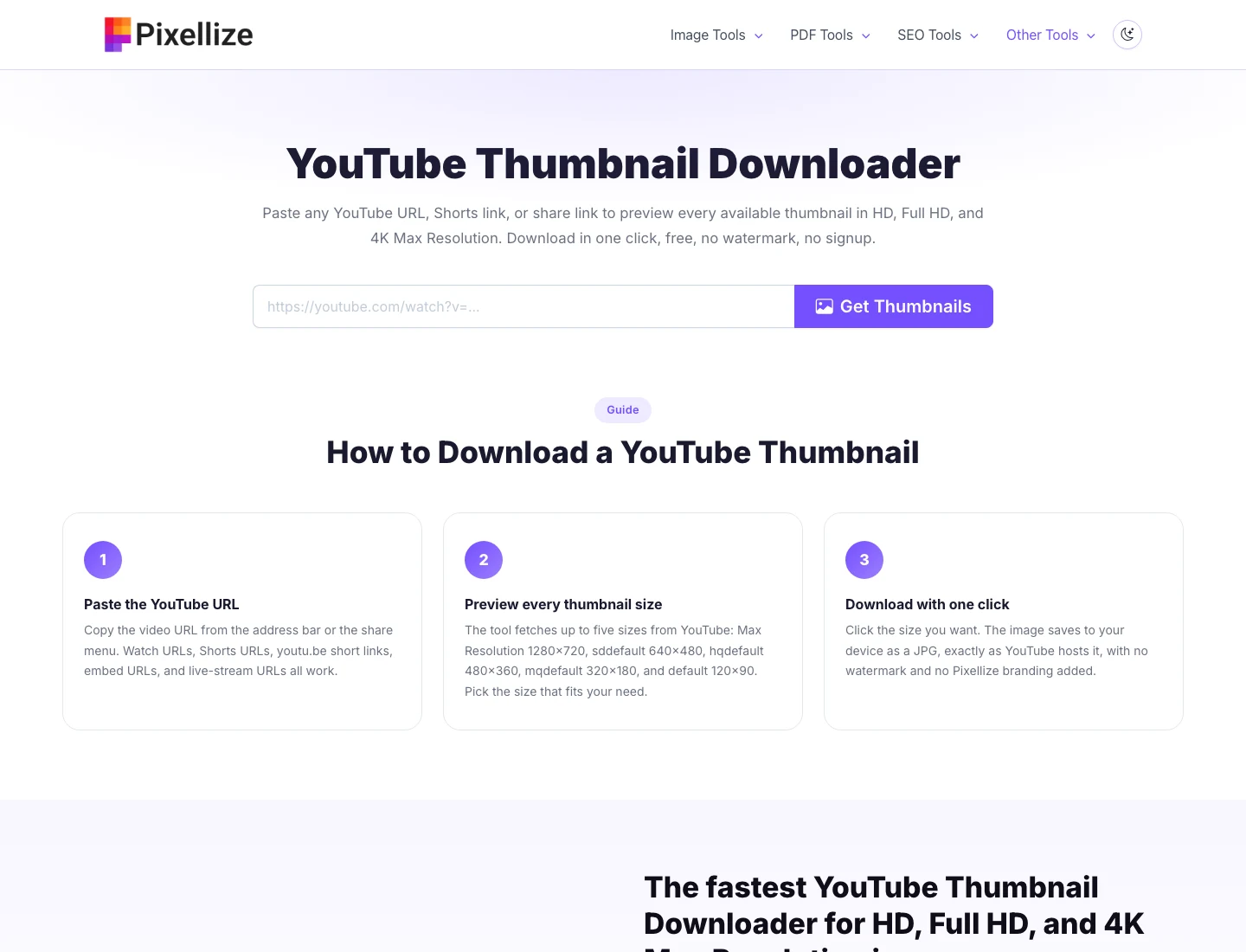
The fastest method is a hosted downloader. The Pixellize YouTube Thumbnail Downloader takes any YouTube URL (regular video, Shorts, live stream, share link, or embed URL), extracts the 11-character video ID, then queries the four standard thumbnail URLs and shows the highest-resolution one available alongside the others. One click downloads, no signup, no watermark.
Best for: a one-paste answer when you want the highest available resolution without thinking about the URL format. Limitation: cannot fetch private, unlisted, or deleted videos because YouTube’s CDN does not serve those thumbnails publicly.
If you know the 11-character video ID, you can request the thumbnail directly from YouTube’s CDN. The URL pattern is:
https://img.youtube.com/vi/<VIDEO_ID>/<QUALITY>.jpgReplace <VIDEO_ID> with the 11-character ID (the string after ?v= in a regular YouTube URL, or after youtu.be/ in a short link, or after /shorts/ in a Shorts URL). Replace <QUALITY> with maxresdefault, sddefault, hqdefault, mqdefault, or default.
For example, the video at https://youtube.com/watch?v=dQw4w9WgXcQ has its HD thumbnail at https://img.youtube.com/vi/dQw4w9WgXcQ/maxresdefault.jpg. Paste the URL into your browser and the image loads. Right-click and Save Image As.
Best for: developers who want to script downloads, or anyone who only needs the URL pattern memorized. Limitation: maxresdefault returns 404 for some videos (older uploads without custom thumbnails), so you may need to fall back to sddefault manually.
Open the YouTube video page, press F12 to open dev tools, switch to the Network tab, filter for “Img”, and reload the page. Look for a request to img.youtube.com/vi/... in the list. Right-click the request and choose “Open in new tab”, then save the image. Or click the request, switch to Preview, right-click the preview image to save.
Best for: when you are already inspecting a page in dev tools and want the thumbnail without switching to another tool. Limitation: slower than the direct URL pattern; useful mainly when debugging or when the URL pattern fails.
Create a browser bookmark with this URL as the address. When you click it on any YouTube watch page, it opens the maxresdefault thumbnail in a new tab:
javascript:(function(){var m=location.href.match(/(?:v=|youtu.be/|shorts/|embed/)([w-]{11})/);if(m){window.open('https://img.youtube.com/vi/'+m[1]+'/maxresdefault.jpg','_blank');}else{alert('Not a YouTube video URL');}})();To install: drag this bookmarklet from your bookmarks bar into the YouTube tab and click it. The thumbnail opens in a new tab where you can right-click and save.
Best for: regular thumbnail grabbing without opening a separate tool. Limitation: one-time bookmark setup, and you have to manually fall back if maxresdefault is missing.
The official YouTube Data API returns thumbnail URLs as part of the video resource. The GET request:
GET https://www.googleapis.com/youtube/v3/videos?part=snippet&id=<VIDEO_ID>&key=<API_KEY>Returns a JSON response where snippet.thumbnails is an object with up to five sizes: default, medium, high, standard, and maxres. Each entry includes a URL, width, and height.
Best for: automated downloads at scale (analyzing thumbnails across a channel, bulk competitor research, programmatic use). Limitation: requires a Google Cloud project, API key, and you burn API quota on every call (default 10,000 units per day, each video lookup costs 1 unit).
Every method above needs the 11-character video ID. YouTube has at least seven URL formats that all encode the same ID:
youtube.com/watch?v=VIDEO_ID, standard desktop URLyoutu.be/VIDEO_ID, share linkyoutube.com/shorts/VIDEO_ID, Shorts URLyoutube.com/embed/VIDEO_ID, embed iframe URLyoutube.com/v/VIDEO_ID, old player URL (rare)m.youtube.com/watch?v=VIDEO_ID, mobile URLmusic.youtube.com/watch?v=VIDEO_ID, YouTube Music URLThe ID itself is always exactly 11 characters and uses letters, numbers, hyphens, and underscores. A reliable JavaScript extractor:
const id = url.match(/(?:v=|youtu.be/|shorts/|embed/|/v/)([w-]{11})/)?.[1];This pattern catches all common URL formats and returns the 11-character ID, or undefined if the URL is not a YouTube video.
Keep in mind that not every YouTube URL behaves identically. Six failure modes come up across every method, with the practical fix next to each.
Roughly 40% of videos on YouTube don’t have a maxresdefault.jpg file, which is the single most common reason a YouTube video thumbnail download silently fails. It only exists when the creator uploaded a custom thumbnail at 1280×720 or larger. Videos uploaded before 2014, Shorts that rely on auto-generated thumbnails, and creator-skipped uploads all serve a 404 at the maxresdefault path. Here’s why that matters: a good downloader checks each size in priority order rather than assuming maxresdefault works.
The fallback chain a good downloader uses: try maxresdefault.jpg first; if 404, try sddefault.jpg; if that 404s too, fall back to hqdefault.jpg. The Pixellize YouTube Thumbnail Downloader runs this fallback automatically and shows you the highest-resolution image actually available.
YouTube Shorts use the same backend infrastructure as regular videos, including the same thumbnail file pattern. The only difference is the URL format: Shorts use youtube.com/shorts/<VIDEO_ID> instead of ?v=<VIDEO_ID>. Once you extract the 11-character ID, every method covered in this guide works identically.
Note that Shorts thumbnails are usually portrait (9:16) framed, but the file YouTube serves is still landscape 16:9 with letterboxing or padding added. The native portrait Shorts frame is not directly downloadable through the public CDN, only through the YouTube Data API which returns the original thumbnail metadata.
Here’s the thing about YouTube video thumbnail download (or any other way of grabbing the file): even though the images are served on a public CDN with no login required, they’re still the creator’s intellectual property under the DMCA. YouTube’s own Terms of Service Section 5 explicitly preserves uploader copyright. Three categories of use, by risk level:
When in doubt, ask the creator. Most YouTubers are happy to grant permission for non-competitive use if you reach out by email or comment.
For most YouTube video thumbnail download needs, a hosted tool gets you the answer in under five seconds. The direct URL pattern method is the no-tool fallback every developer should remember, and the bookmarklet is the one-click setup for power users. Knowing how to download a YouTube video thumbnail in any resolution is one of those small skills that pays off every time you study a video’s design or build a thumbnail-research collection. Pair it with related Pixellize tools like the YouTube Tags Extractor for full competitive video analysis, or read the YouTube thumbnail size guide when you are about to design your own.
The fastest method is to paste the YouTube URL into the Pixellize YouTube Thumbnail Downloader, which extracts the video ID and returns the thumbnail in HD, Full HD, and 4K resolutions for one-click download. For developers, the direct URL pattern img.youtube.com/vi/VIDEO_ID/maxresdefault.jpg works without any tool.
Yes. Shorts use the same thumbnail file pattern as regular videos. Paste the Shorts URL (youtube.com/shorts/VIDEO_ID) into any YouTube thumbnail downloader, or extract the 11-character video ID and use the direct img.youtube.com URL pattern.
YouTube serves four standard sizes for every video: maxresdefault (1280x720 HD), sddefault (640x480 SD), hqdefault (480x360 HQ), and mqdefault (320x180 medium). Plus default.jpg at 120x90 for playlists. True 4K thumbnails require the YouTube Data API and are only available when the creator uploaded a 4K image.
The HD thumbnail (maxresdefault) only exists when the creator uploaded a custom thumbnail at 1280x720 or larger. Auto-generated thumbnails (the three frame previews YouTube picks) do not have a maxresdefault version. Fall back to sddefault.jpg or hqdefault.jpg, which always exist.
The video ID is the 11-character string of letters, numbers, hyphens, and underscores. It appears after watch?v= in standard URLs, after youtu.be/ in share links, after /shorts/ in Shorts URLs, and after /embed/ in embed iframes. The regex /(?:v=|youtu.be/|shorts/|embed/)([w-]{11})/ captures all formats.
Downloading is generally fine for personal study, design inspiration, internal research, and fair-use commentary. Reusing the thumbnail in commercial content, marketing material, or presenting it as your own work requires permission from the creator. Public availability on YouTubes CDN does not waive copyright.
No. YouTube does not serve thumbnails for private, unlisted, or age-restricted videos through the public img.youtube.com CDN. The video must be publicly viewable. For age-restricted videos, signing in to YouTube first may let some tools fetch the thumbnail; private and unlisted are not accessible.
Use the direct URL pattern: replace VIDEO_ID in https://img.youtube.com/vi/VIDEO_ID/maxresdefault.jpg with the 11-character ID from the YouTube URL. Paste in your browser, right-click the image, choose Save Image As. No tool, no signup, no ads.
maxresdefault (1280x720) is the highest-resolution thumbnail YouTube serves and only exists for videos with custom uploaded HD thumbnails. sddefault (640x480) is the standard fallback and always exists for every public video. If maxresdefault returns 404, sddefault is the next-best option.
Yes, via the YouTube Data API. Make a request to youtube/v3/search?channelId=YOUR_ID to get all video IDs from a channel, then loop through each ID and fetch its thumbnail URLs. Requires a Google Cloud project and API key. Each video lookup costs 1 unit of the default 10,000 daily quota.
Open YouTube Studio, go to Content, hover your video, click the three-dot menu, and choose Download thumbnail. YouTube gives you the exact image you uploaded at full resolution. This only works for videos on your own channel; for anyone else use the direct image URL or a downloader.
You do not need an app. Open the thumbnail direct URL (img.youtube.com/vi/VIDEO_ID/maxresdefault.jpg) in your phone browser, then long-press the image. On iPhone Safari tap Save to Photos, on Android Chrome tap Download image. It saves straight to your gallery.

Founder and CEO of Pixellize.io, building AI-powered web tools and digital products with a focus on user experience and automation. M.Sc. Zoology, working at the intersection of technology, data analytics, and life sciences.