
YouTube Dislike Viewer & Checker: See Hidden Dislikes 2026
YouTube hid public dislike counts in 2021. A youtube dislike viewer brings them back as community estimates. Here is how to use…
Read article
Most channels that stop growing are not failing because their content is bad. They are failing because the algorithm cannot tell who their videos are for. YouTube channel optimization is the set of small, boring decisions that close that gap. Title structure, thumbnail design, the first 15 seconds, the about box, the playlists no one bothers to make. This guide covers the six levers that actually move the algorithm in 2026, what good looks like on each, and a 30 minute audit you can run on your channel today.
Backlinko, Sprout Social, and SEO Sherpa all converge on roughly the same shortlist of factors, with one notable shift in 2026. Watch time still matters, but viewer satisfaction signals (post-watch surveys, return visits, downvotes that stick) now carry more weight than total minutes watched.
Influencer Marketing Hub’s 2025 data shows creators posting three or more times per week grow about sixty percent faster than weekly posters. Frequency itself is not a ranking factor, but it generates more impressions, which feeds CTR, which feeds reach.
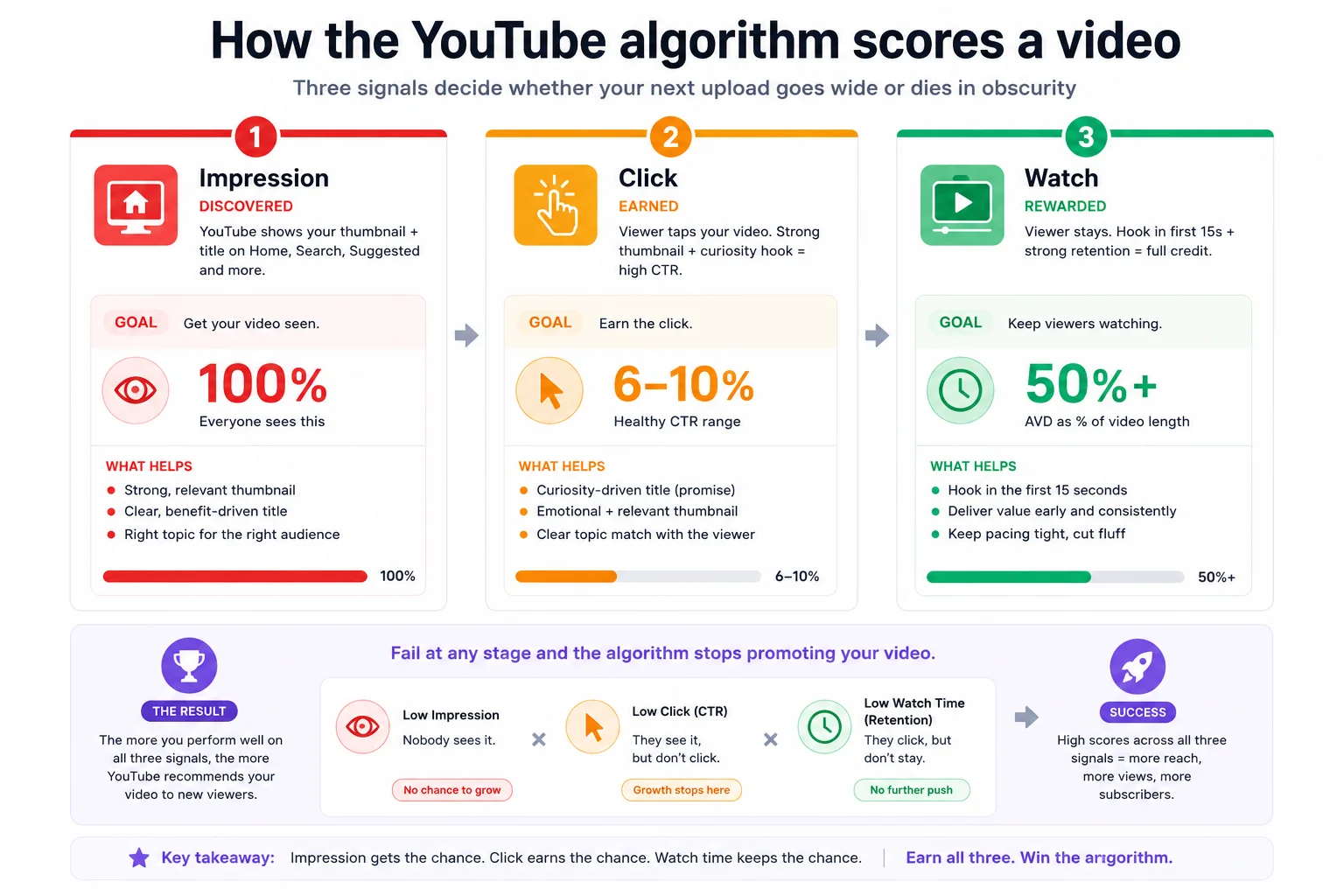
Every video goes through three gates. The algorithm only promotes you past one gate if you pass the previous one.
YouTube shows your thumbnail and title to a small test audience on the home feed, search results, and suggested videos. This costs you nothing but tells the algorithm one thing: are people interested?
Healthy CTR sits between 6 and 10 percent for most niches. Anything under 4 percent and the algorithm decides nobody wants to click. The video stops getting impressions. Tutorials and how-to content often hit 8 to 12 percent. Entertainment and vlogs run lower at 4 to 7 percent.
Once viewers click, the algorithm watches what they do. AVD as a percentage of total length is the cleanest signal. Aim for 50 percent or higher on long-form, and 70 percent or higher on Shorts. Sub-30 percent AVD on long-form is a flag that the video is misleading or boring, and the algorithm responds accordingly.
Titles need to do two jobs at once: be searchable (have the keyword) and be curiosity-driving (make someone want to click). Some formulas that consistently outperform plain descriptive titles:
Keep titles under 60 characters so they do not truncate on mobile suggested feeds. Put the keyword in the first 50 characters. Avoid all-caps and stacked emoji, both of which YouTube quietly penalizes in suggested rankings.
Thumbnails are 80 percent of CTR. Most creators spend 5 percent of their time on them. Reverse that ratio. A good thumbnail follows four rules.
Custom thumbnails belong on every video, including Shorts. Use a YouTube thumbnail downloader to study what your top competitors and your own best videos have in common. Patterns show up fast once you have ten thumbnails side by side.
Most descriptions are 30 words of generic copy and a Patreon link. Wasted real estate. A useful description is 150 to 300 words, covers the topic in plain text (helps the transcript and search index), and links to two or three related videos plus your strongest playlist.
Tags are the most overrated YouTube feature. They help only when your title is ambiguous or misspelled by viewers. Add 10 to 15 relevant tags using your primary keyword, two or three synonyms, and a few branded variations. Anything more is noise. If you want to research what top videos are tagged with, a YouTube tags extractor pulls the live list from any public video.
Chapters are the cheapest watch-time hack on the platform. Adding timestamps lets viewers jump to the section they want, which sounds bad for AVD but is actually good. Viewers who would have bounced now stay and skip to the part they care about, and the algorithm credits the watch time that follows.
YouTube Analytics shows a retention curve for every video. The biggest dropoff almost always happens in the first 15 seconds. If you fix nothing else, fix that opening.
Retention at 30 seconds is the single most predictive metric for whether a video goes wide. Aim to hold 70 percent of viewers past the 30 second mark on long-form.
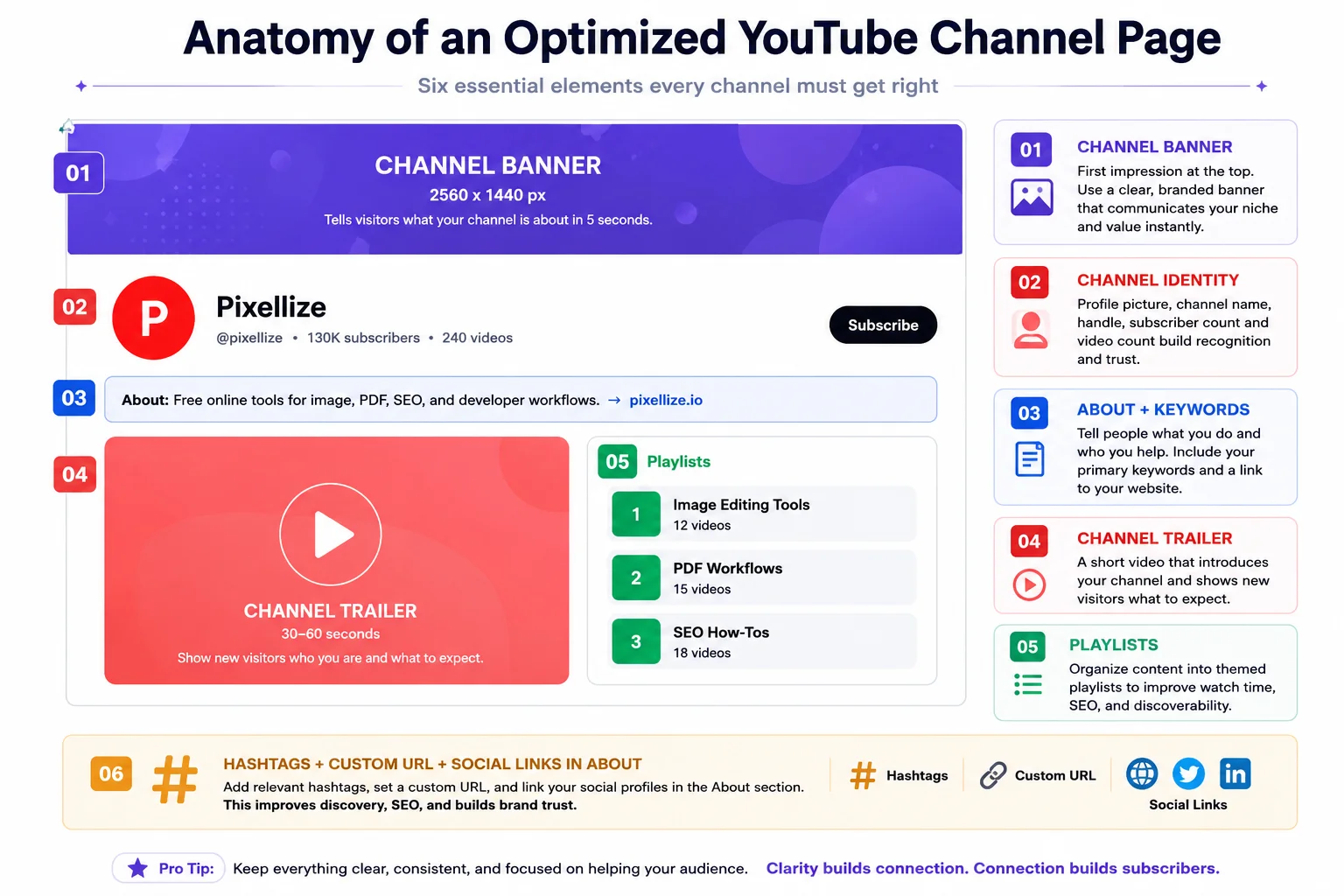
Your channel page is the first stop for anyone deciding whether to subscribe after watching one video. Six elements matter.
If you want the banner to look right across desktop, tablet, and TV, you need a 2560 x 1440 image with the safe zone (the part that always shows) centered at 1546 x 423. Anything outside that safe zone gets cropped on smaller screens.
The Shorts and long-form algorithms are now fully decoupled. A viral Short does not help your long-form videos, and a banger long-form video does not lift your Shorts. Treat them as separate channels living on the same handle.
Run this audit on your own channel right now. Each item is 2 to 5 minutes. By the end you will know exactly what is broken.
Optimization is the multiplier on top of content. If the content is genuinely bad, no thumbnail and no chapter list saves it. The signals that move the algorithm are downstream of viewers liking what they see.
Things this guide does not cover: monetization (CPM, AdSense, Premium revenue), copyright strikes and disputes, equipment buying advice, scripting and editing workflow, and brand sponsorship outreach. Those deserve their own write-ups.
YouTube channel optimization is not one big move. It is 30 small ones that compound. Get titles and thumbnails right at the top of the funnel, keep retention high through the first 30 seconds, and let the algorithm do its work from there. Audit your channel monthly using the 10 step list above and you will catch issues before they cost you a month of growth.
If you want help with the metadata side, Pixellize ships a free YouTube Thumbnail Downloader and a YouTube Tags Extractor. Both run in your browser, no signup, no watermark.
Studying rivals? Here is how to download a YouTube video thumbnail for research.
YouTube channel optimization is the practice of tuning every element of your channel and videos so the algorithm understands who your content is for. It covers titles, thumbnails, descriptions, tags, the about section, playlists, channel trailer, upload cadence, and the analytics signals that decide whether your videos get pushed to new viewers.
Most channels see CTR improvements within two to three weeks of fixing thumbnails and titles. Retention improvements from fixing the first 15 seconds show up in the next 10 videos. Major channel-page changes (banner, playlists, trailer) compound over one to two months as new visitors land on the optimized page.
They matter less than they did. Tags help mostly when your title is ambiguous or commonly misspelled. Add 10 to 15 relevant tags, use your primary keyword and two or three synonyms, and stop there. The bigger ranking signals are CTR, AVD, and watch-time satisfaction.
Most niches see healthy CTR between 6 and 10 percent on impressions. Tutorials and how-to content often hit 8 to 12 percent. Entertainment and vlogs run lower at 4 to 7 percent. Anything under 4 percent means the algorithm stops pushing the video to new audiences.
One to two long-form uploads per week is the sweet spot for most channels. Above that, retention quality often drops. For Shorts, three to seven per week is normal because the format is high-variance. The Shorts and long-form algorithms are decoupled, so optimize each separately.
Not as much as creators think. The algorithm cares about viewer response to each video. A 1,000 subscriber channel with 50 percent AVD and 9 percent CTR will out-recommend a 100,000 subscriber channel with 25 percent AVD and 3 percent CTR. The Hype feature (500 to 500K subs) does give smaller channels a temporary boost on new uploads.
No. The Shorts and long-form algorithms are fully decoupled in 2026. A viral Short does not lift your long-form videos and vice versa. Use Shorts for discovery and audience top-of-funnel. Use long-form for retention, monetization, and depth. Optimize each format separately for its own metrics.

Founder and CEO of Pixellize.io, building AI-powered web tools and digital products with a focus on user experience and automation. M.Sc. Zoology, working at the intersection of technology, data analytics, and life sciences.