
How GST Is Calculated in India: 5%, 12%, 18%, 28% Rates With Examples
Last updated: June 2026 · Reading time: 9 min · Reviewed for accuracy by the Pixellize editorial team. For filing-specific guidance, always…
Read article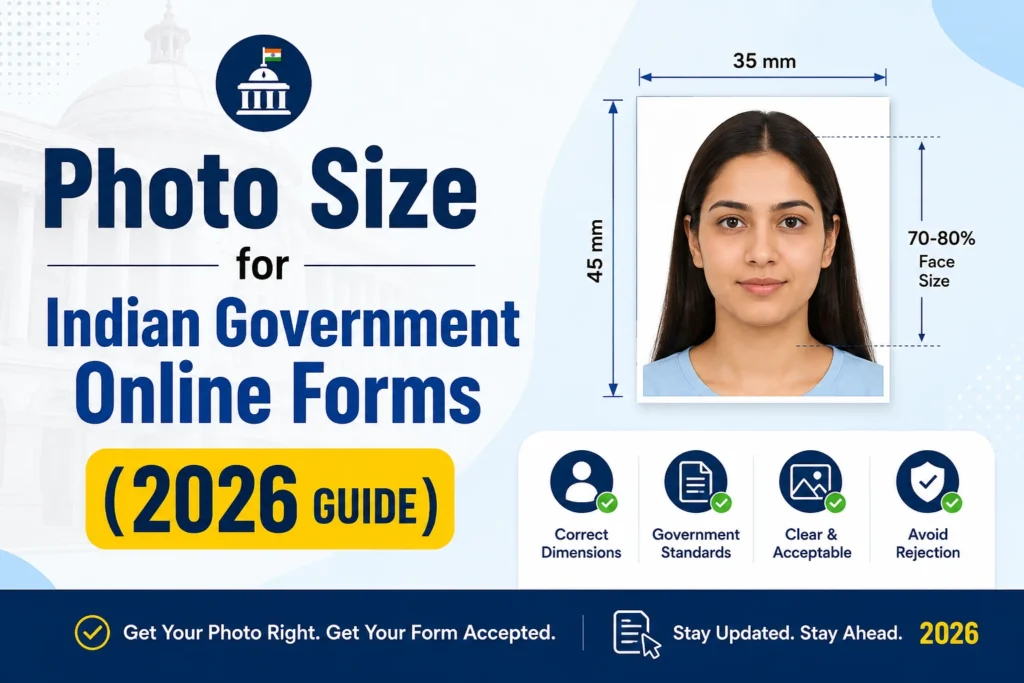
Indian government online forms reject more applications for bad photo uploads than for missing documents. The reason is almost always the same: wrong pixel dimensions, file size outside the KB cap, PNG uploaded instead of JPG, or a phone photo with a wall in the background. This guide lists the exact photo size for online form submissions across every major Indian recruitment and admission portal (UPSC, SSC, IBPS, NEET, JEE, Railway, GATE, CAT, banking), shows what gets rejected, and explains the one-tool workflow that produces a compliant photo and signature pair in under a minute.
Almost every Indian government online form falls into one of three pixel size categories. Memorize these three and you will be ready for 80 percent of portals.
Signature dimensions are usually 140 x 60 pixels (landscape, fits a single signed line). NEET and a few admission forms accept slightly different signature sizes, listed in the table below.
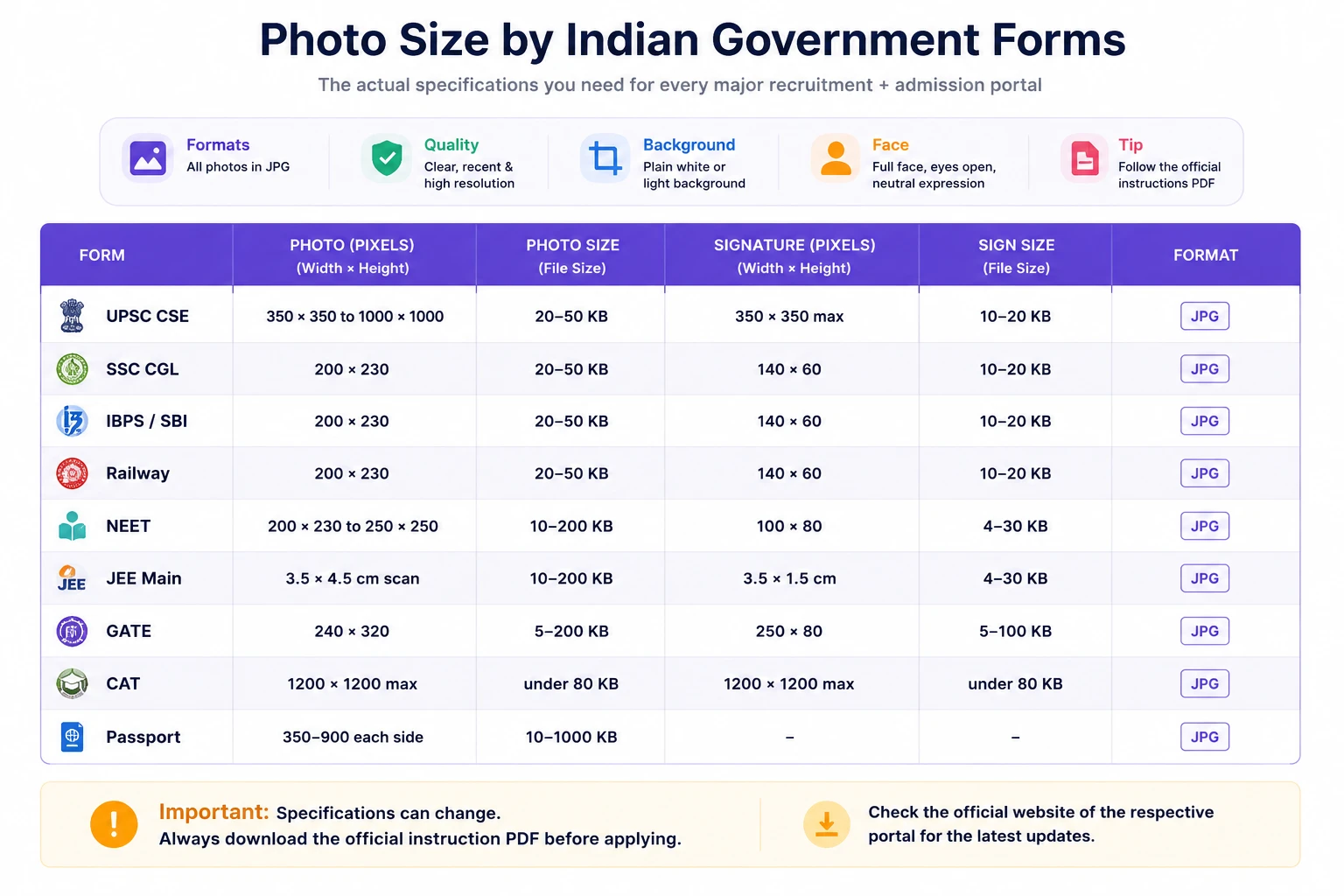
The table covers the dimensions that were valid in the most recent notification cycles. Specifications change with each notification, so always download the official instruction PDF from the form portal before you upload.
Most Indian government portals run on infrastructure built for millions of concurrent uploads during peak application windows. Capping file sizes is the only way to keep the upload service alive when 200,000 candidates submit forms on the last day. That is why you see hard limits like 20 KB minimum to 50 KB maximum on SSC, Railway, IBPS, and bank exam portals.
The minimum exists for a reason too. A photo under 10 KB is usually so low-resolution that face recognition systems used for shortlisting cannot read it. That is why NEET, JEE, GATE, and most admission forms set both a floor and a ceiling.
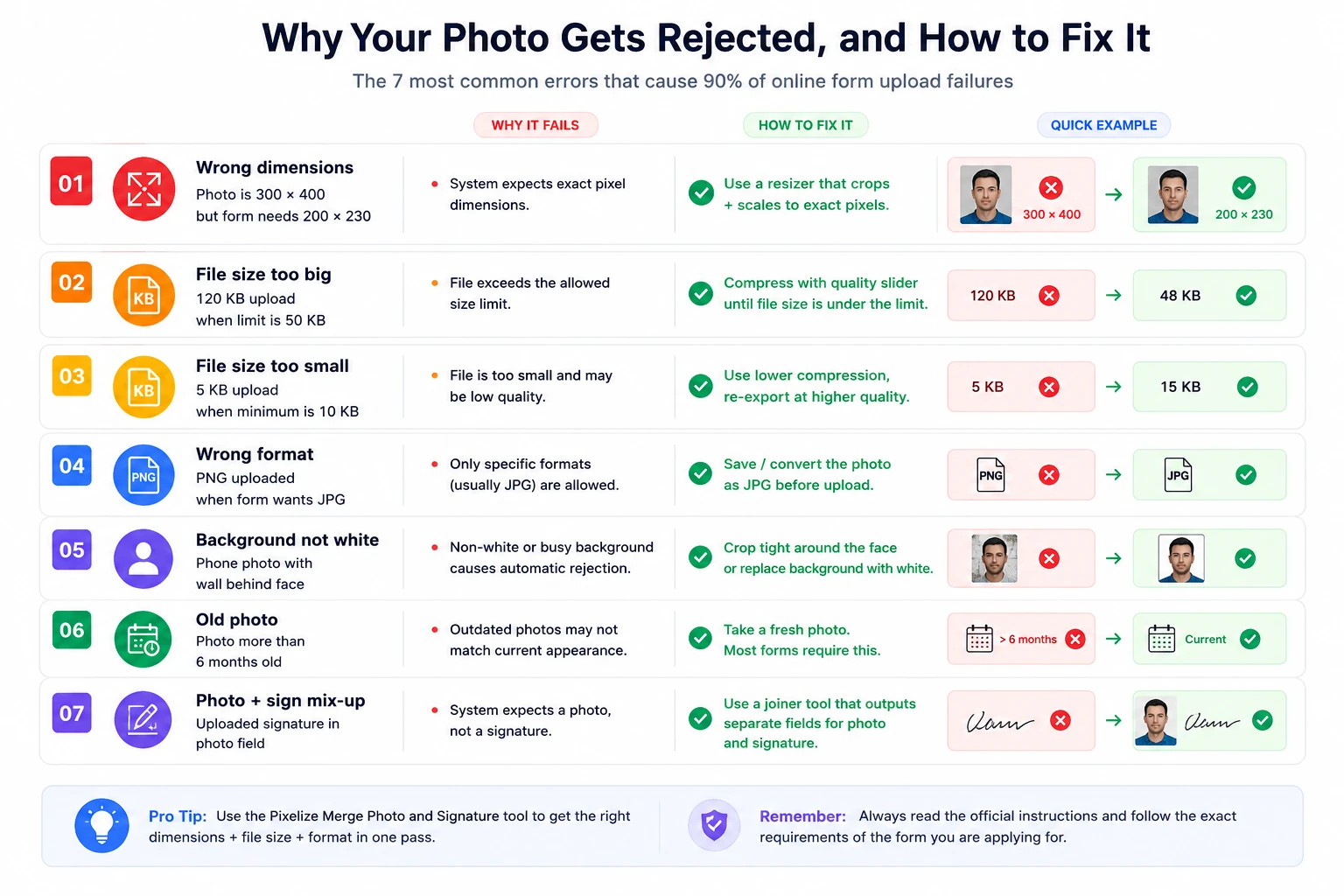
If your photo upload gets rejected by an Indian government form, it is almost always one of these seven issues. Match the error to the fix and re-upload.
Beyond the pixel and KB rules, every Indian government online form has the same basic photo content rules:
Signature requirements are stricter than people expect. Use a black or dark blue pen on plain white paper. Sign within a roughly 3 x 1.5 cm box. Do not include your printed name above or below the signature, only the signature itself. The portal does not want your full name written out, it wants the actual signing mark.
Most people doing this manually open Photoshop or MS Paint, resize the photo, save, check the file size, open compression software, compress, check again, repeat until it fits, then do the same for the signature. That takes 15 to 20 minutes per upload and is the reason most candidates wait until the last day to apply.
A purpose-built joiner tool collapses this into one screen. The Pixellize Merge Photo and Signature tool accepts your photo and your scanned signature, lets you set the exact output dimensions (200 x 230 px, 276 x 354 px, or custom), set the target file size in KB so the compression hits your form’s cap on the first save, and exports a single merged JPEG or two separate files depending on what the form wants. Everything runs in your browser, nothing is uploaded to a server, which matters for documents that include your face and signature.
To stay honest about scope: this guide covers the most common Indian government online forms in 2026. It does not cover state-specific PSC forms with unusual size requirements (each one publishes its own instruction PDF you should read), private company exam portals, or international visa applications outside the Indian system. Each form publishes its own notification with the binding spec. When in doubt, the official PDF wins.
Photo size for online form uploads in India is more rules than judgement. Memorize 200 x 230 px, 20-50 KB, JPG, white background and you will pass 80 percent of portals on the first try. For the rest, use the table above to find your form, match the spec, and resize once. If you do this for more than two or three applications a year, a dedicated Merge Photo and Signature tool will save you hours of file-size juggling.
Once your dimensions are right, you may still need to increase the photo size in KB to clear a portal minimum.
Once you know the size a form needs, resize the image to those exact pixels and set the KB limit before uploading.
The most common photo size is 200 x 230 pixels (portrait, slightly taller than wide) at 20 to 50 KB file size in JPG format. This applies to SSC CGL, IBPS, SBI, Railway, and most state PSC online forms. UPSC CSE accepts a wider range (350 to 1000 pixels per side), and NEET and JEE Main allow larger file sizes (up to 200 KB).
Most Indian government recruitment portals (SSC, Railway, IBPS, banking exams) require a photo between 20 KB and 50 KB. UPSC CSE uses the same 20 to 50 KB range. NEET and JEE Main are more generous at 10 to 200 KB. Indian visa and passport applications accept up to 1000 KB. Always check the official notification PDF for the exact range.
The standard signature size is 140 x 60 pixels (landscape orientation) at 10 to 20 KB in JPG format. Sign with a black or dark blue pen on plain white paper. Crop tight to the signature itself, do not include your printed name above or below it.
The most common reasons are: file size is over the KB limit even after resizing (compress further), background is not pure white (a wall or curtain shows up), photo is more than 6 months old, or the dimensions are slightly off (203 x 232 instead of exactly 200 x 230). Use a tool that lets you set both pixel dimensions and a target KB cap in one pass.
Yes, but only if you crop it correctly. Stand against a plain white wall with even lighting, take the photo from chest height with the camera straight on, and crop tight so the face occupies 70 to 80 percent of the frame. Most rejections happen because phone photos include too much of the surroundings.
Photo size in pixels (e.g. 200 x 230 px) is the image dimensions. Photo file size in KB (e.g. 20 to 50 KB) is the amount of data the file takes up on disk. Both must match the form's requirements at the same time. A 200 x 230 px image can be 8 KB (too small for most forms) or 120 KB (too big), depending on the JPG compression level used when saving.
Almost every Indian government online form accepts only JPG (also written as JPEG). PNG, WebP, BMP, and TIFF are rejected. If your photo is in another format, convert it to JPG before uploading. Phone gallery apps usually export as JPG by default, but newer iPhones save HEIC, which must be converted.

Founder and CEO of Pixellize.io, building AI-powered web tools and digital products with a focus on user experience and automation. M.Sc. Zoology, working at the intersection of technology, data analytics, and life sciences.