
How Long Should a Meta Description Be? Length Guide
You spend an hour writing the perfect meta description, then Google shows the world a version cut off with an ellipsis right…
Read article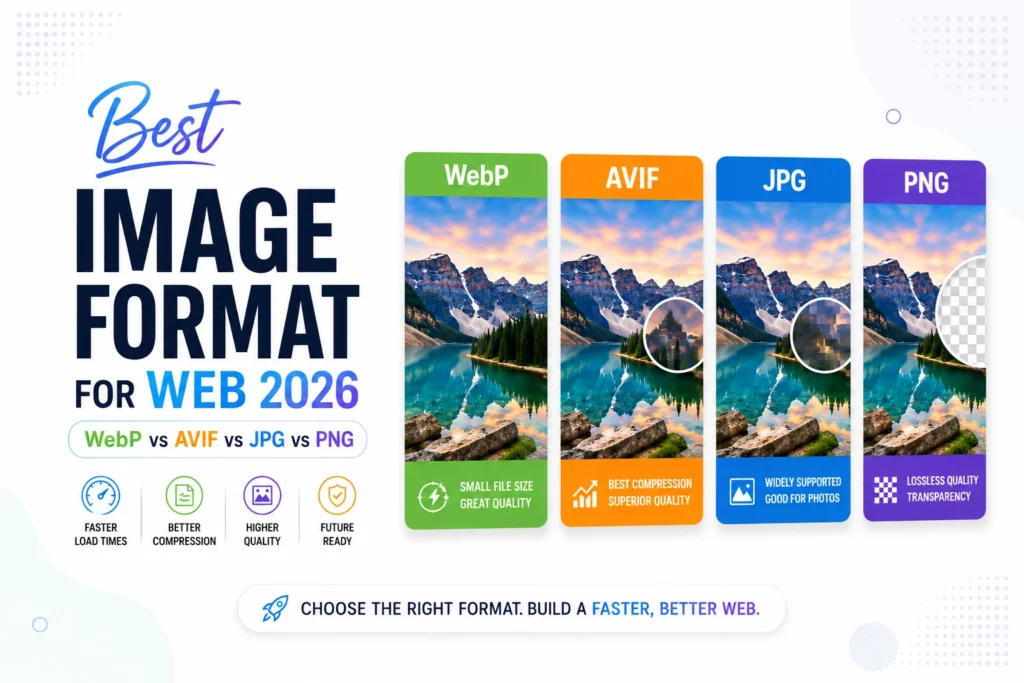
The best image format for the web in 2026 is WebP for almost every site, with AVIF as the next-step upgrade for maximum compression and JPG kept only as a fallback for old browsers. PNG stays useful but only when you need lossless quality or true transparency.
Every web project hits the same fork in the road. You finish a design with twenty images, hit publish, and Lighthouse drops a 65 on Performance. Half the cause is image weight. The other half is using the wrong format. This guide walks through JPG, PNG, WebP, and AVIF with real numbers, a 2026 browser support table, and a decision tree at the end so you can pick the right format in 30 seconds.
| Format | Best for | Relative file size | Transparency | Browser support |
|---|---|---|---|---|
| WebP | The 2026 default for photos and graphics | ~50% of JPG | Yes | ~96% globally |
| AVIF | Sites that need maximum compression | ~25% of JPG | Yes | ~90% globally |
| JPG | Fallback for older browsers | 100% (baseline) | No | Universal |
| PNG | Logos, icons, screenshots needing lossless | ~3× JPG | Yes | Universal |
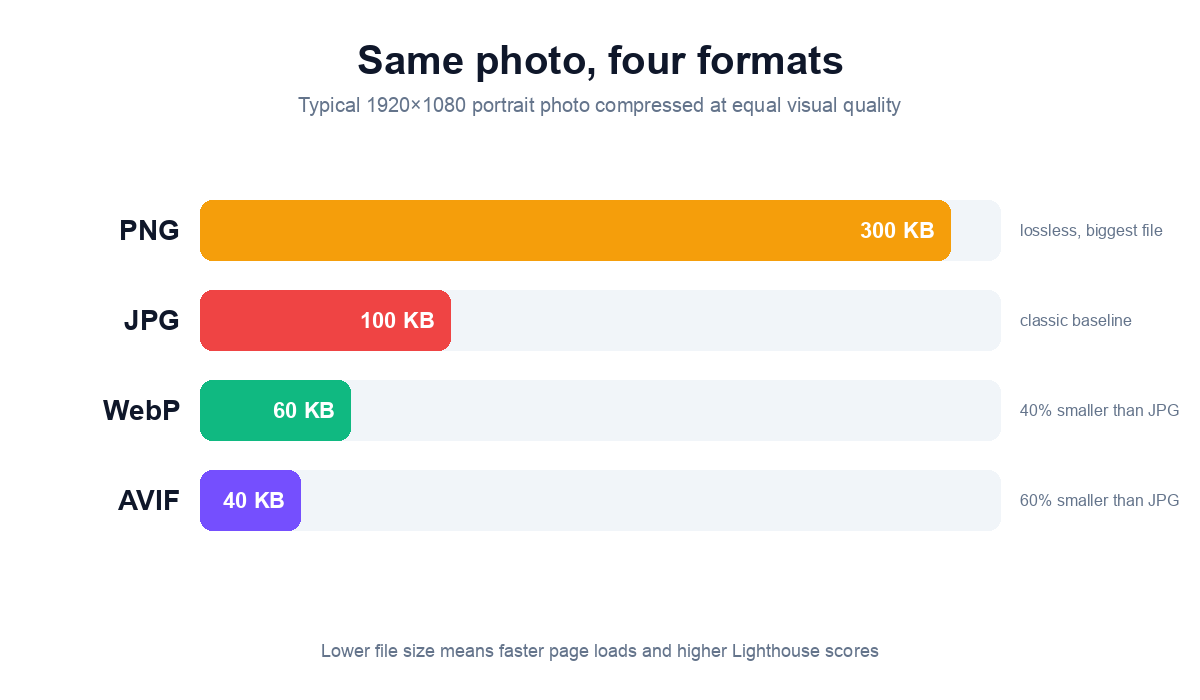
JPG is a lossy compression format from 1992 that handles photographs well, has no transparency support, and works in every browser ever made. It is the universal fallback but it is no longer the right default for new content.
Use JPG when you need a single file that works in every conceivable client (email previews, very old corporate browsers, government systems). For new web work, JPG should appear only inside a picture element as the fallback after WebP and AVIF sources.
JPG at 90 percent quality is invisibly different from the original to most eyes and cuts file size to about half. At 80 percent the file shrinks again and most viewers still cannot tell. Below 70 percent compression artifacts (those blocky 8×8 squares around edges) start to show, especially in dark or solid-color areas. Our free JPG Converter defaults to 90 percent and lets you slide to Best 95, Medium 80, or Small 70.
PNG is a lossless format from 1996 that preserves every pixel exactly and supports full alpha-channel transparency, but produces files roughly three times the size of an equivalent JPG. It is the right choice for logos, icons, screenshots, and any graphic where you need transparency or pixel-perfect edges.
Full-color PNG (PNG-24) uses 24 bits per pixel and handles photographs and gradients without color banding. Indexed PNG (PNG-8) reduces the palette to 256 colors per file and cuts size by 40 to 60 percent, which is perfect for flat illustrations, icons, and screenshots of UI. Our free PNG Converter exposes both modes with a single toggle.
PNG wins over WebP when you need every pixel exactly preserved for printing, archival storage, or pixel-art work. WebP lossless is also available but produces slightly larger files than PNG-24 for some content. For everything else on the web in 2026, WebP transparency is good enough and the file is half the size.
WebP is the Google-developed image format from 2010 that compresses 25 to 35 percent smaller than JPG at equal quality, supports both lossless and lossy modes plus full transparency, and is supported by every modern browser including Safari since version 14. In 2026, WebP is the right default for almost every photograph and graphic on a new website.
WebP runs at roughly 96 percent global browser support (Chrome, Firefox, Edge, Safari 14+, Opera, Samsung Internet, every modern mobile browser). The file-size savings are real on every photograph. Converting a typical 200 KB JPG to WebP usually yields a 90 to 120 KB file with no visible difference. Multiply that across 30 product photos on an ecommerce page and you have cut total weight by 2.5 MB.
Lossy WebP uses VP8 video compression and is what you want for photographs. Lossless WebP preserves every pixel exactly and beats PNG-24 file size in most cases (it is rare for lossless WebP to be larger than PNG). Our free WebP Converter lets you pick Lossless, High 90, Medium 80, or Small 70 from a single bar at the top.
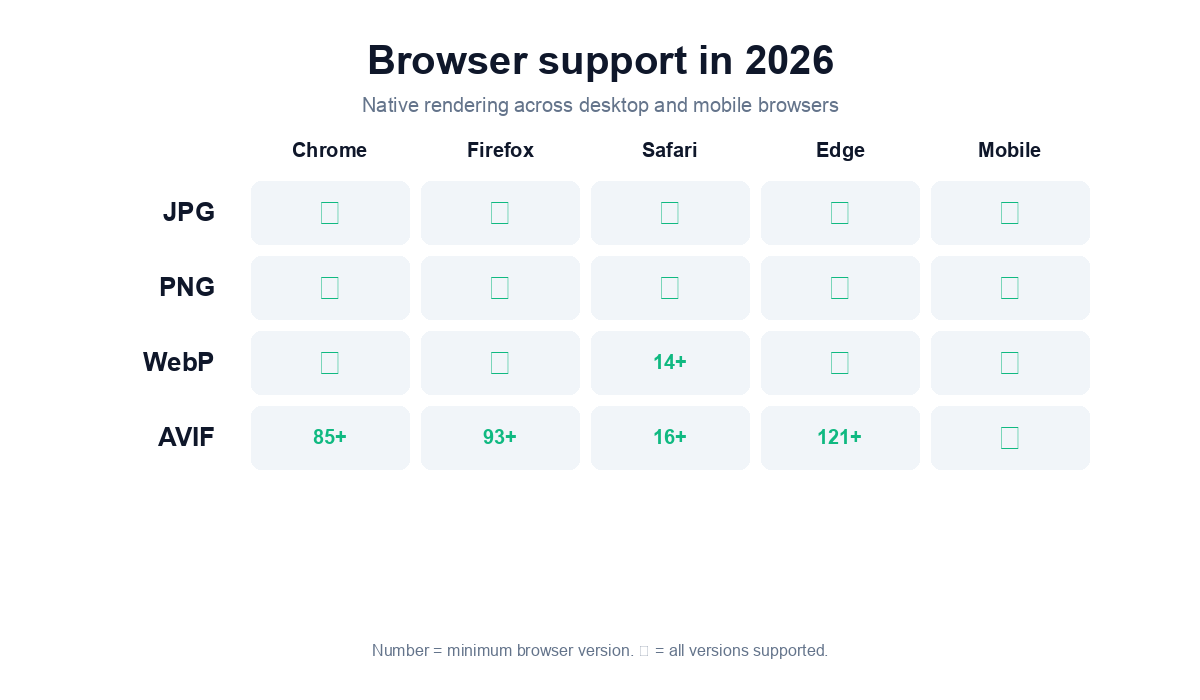
AVIF is the AV1 Image File Format released in 2019, derived from the AV1 video codec. It produces files roughly 50 percent smaller than WebP at equal visual quality and 70 to 75 percent smaller than JPG, with full transparency and 12-bit color depth. As of 2026 it is supported by ~90 percent of browsers.
AVIF wins when image weight is a measurable Lighthouse bottleneck and you can afford the conversion pipeline. News sites, ecommerce, photography portfolios, and any high-traffic property where a 30 percent additional save on image bytes translates to meaningful bandwidth savings will benefit. For a small blog or marketing site, WebP is usually good enough.
AVIF does not support progressive rendering, so files must be fully downloaded before they can display. In practice this is rarely a problem because AVIF files are so much smaller. Encoding AVIF is also slow, AVIF encoders take 5 to 10 times longer than WebP encoders for the same image. For a build pipeline that runs once, this is fine. For real-time conversion on user upload, WebP is the better choice. Check the latest support at caniuse.com/avif.
For SEO and Core Web Vitals, smaller image files mean faster Largest Contentful Paint, better Lighthouse Performance scores, and lower data costs for mobile users. AVIF wins on absolute file size, WebP wins on practicality (faster encoding, simpler tooling), and both are recommended over JPG and PNG for any new web project.
Google has been recommending modern image formats since 2014. In 2026 their Lighthouse tool flags any JPG or PNG larger than 4 KB as a potential WebP or AVIF candidate. PageSpeed Insights gives the “Serve images in next-gen formats” audit a high impact on the Performance score.
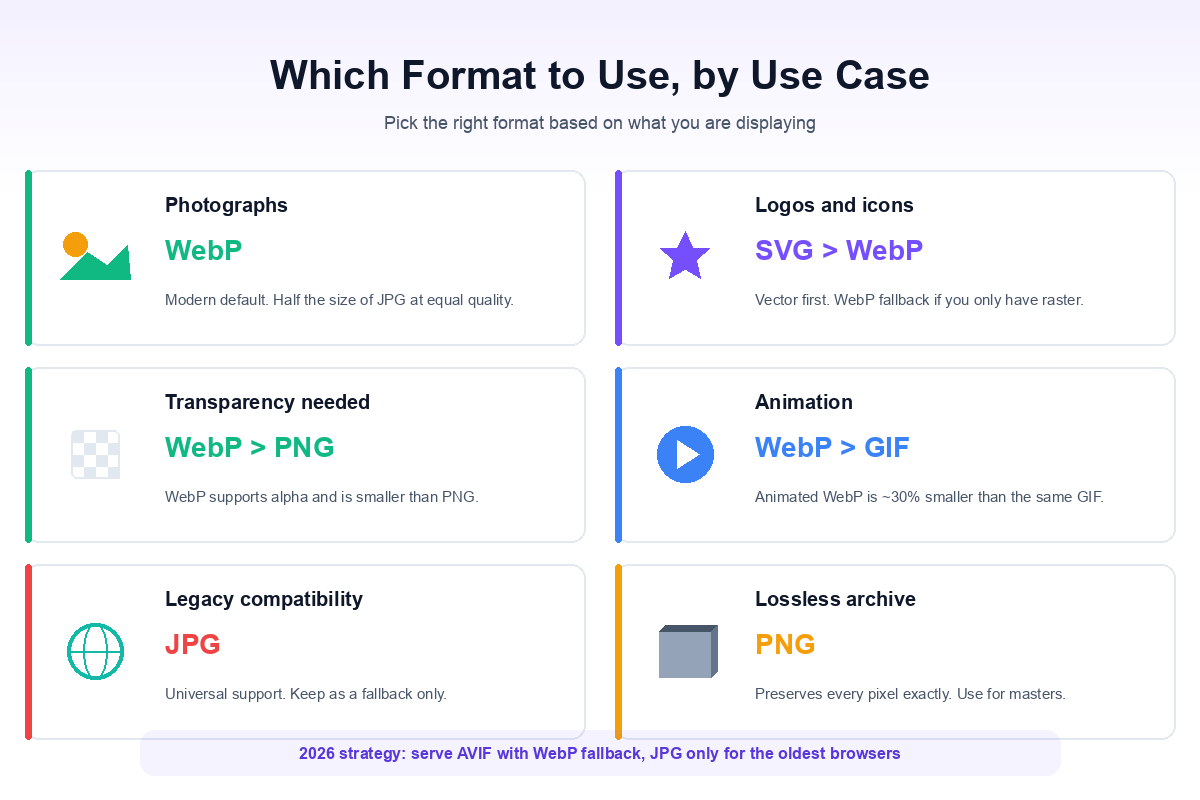
The safest production strategy in 2026 is to serve AVIF as the primary source, WebP as the next fallback, and JPG or PNG only as the last fallback for legacy clients. The HTML looks like this:
<picture>
  <source type="image/avif" srcset="hero.avif">
  <source type="image/webp" srcset="hero.webp">
  <img src="hero.jpg" alt="Hero" width="1200" height="630">
</picture>
Most modern static site generators (Astro, Next.js, Hugo) and WordPress optimizer plugins (LiteSpeed Cache, EWWW, ShortPixel) handle this picture-element fallback chain automatically. If you are converting individual files, our free converters all run in your browser or on our server and add no watermark.
For new web work in 2026 the answer is simple: WebP as the default, AVIF when you need every last byte saved, JPG as a fallback, and PNG only for lossless transparency or screenshots. Most projects can stop reading here and convert everything to WebP today. Run the converter on your image folder, swap the file extensions in your HTML, and watch your Lighthouse Performance score climb by 10 to 25 points within an hour.
WebP is the best default for almost every web image in 2026 because it cuts file size 25 to 50 percent compared to JPG while keeping equivalent visual quality. AVIF is the next upgrade when maximum compression matters. JPG is now only a fallback for older browsers.
Yes. WebP is roughly 50 percent of the file size of an equivalent JPG at the same visual quality, which directly improves Largest Contentful Paint, Total Blocking Time, and Lighthouse Performance scores. Google has been recommending WebP and AVIF over JPG since 2014 and Lighthouse explicitly flags JPG files larger than 4 KB.
Use WebP for almost everything. AVIF makes sense when you need maximum compression on a high-traffic site and have an automated conversion pipeline. AVIF files are roughly half the size of WebP but encoding takes 5 to 10 times longer.
Yes for logos, icons, screenshots, and any graphic that needs lossless quality or alpha-channel transparency. For photographs PNG is too big in 2026, use WebP or AVIF instead. PNG-8 (indexed) is still useful for icons because it can be 40 to 60 percent smaller than PNG-24.
Yes. Safari has supported WebP since version 14 (released 2020) and AVIF since version 16 (released 2022). All current macOS and iOS browsers render both formats natively. The older Safari fallback for WebP is no longer needed for 96 percent of users.
Use a converter that lets you pick the quality setting. Set it to High (90 percent) or Best (95 percent) and the WebP output will be visually indistinguishable from the source JPG, with file size cut by 30 to 50 percent. The Pixellize WebP Converter has these presets built in.
No, as long as you serve WebP through a picture element with a JPG or PNG fallback. Modern browsers pick WebP automatically and older browsers fall back to JPG. WordPress optimizer plugins like LiteSpeed Cache and EWWW handle this fallback for you when you enable WebP delivery.

Founder and CEO of Pixellize.io, building AI-powered web tools and digital products with a focus on user experience and automation. M.Sc. Zoology, working at the intersection of technology, data analytics, and life sciences.