
Best Free WordPress Themes 2026: 10 Fast Picks Ranked
Compare the best free WordPress themes for 2026: ten fast, flexible picks, what each does well, and how to find the theme…
Read article
If you run a WordPress site that uses Contact Form 7, WPForms, or Ninja Forms, here is a question worth asking: what happens to a form submission if the notification email never arrives? On most sites, the answer is: nothing. The lead is gone. Email-only delivery is a single point of failure, and bounced notifications, spam filtering, and accidental inbox cleanup quietly cost businesses thousands of leads every month. This guide covers how to save contact form 7 wpforms and ninja forms submissions to a WordPress database, in one free plugin, so every entry is preserved no matter what happens to the email.
Contact Form 7 ships with no database storage. WPForms Lite ships with no database storage either, that is a paid Pro feature at $49.50 per year. Ninja Forms free version ships with no native database storage. So if a default WordPress site uses any of these three popular form builders, every submission lives in exactly one place: the recipient’s email inbox.
That is a fragile arrangement. Email servers go down. Spam filters get aggressive. People archive or delete old emails. SMTP relays bounce. WordPress core’s wp_mail can silently fail when a hosting provider rate-limits outbound sending. Any of these breaks the only path between the form submitter and you, and there is no record after the fact that the submission ever existed.
Saving submissions to your WordPress database fixes the single-point-of-failure problem. The form fires its normal notification email, AND it also writes the submission to a custom database table at the same time. If the email arrives, great. If it does not, the entry is still there in the admin dashboard, searchable, exportable, and recoverable.
If you only use one form plugin, several established options exist: Flamingo (official Contact Form 7 add-on), CFDB7, WPFormsDB, and the like. The problem is that most agency sites and growing businesses use TWO or THREE form plugins side by side: Contact Form 7 for simple contact pages, WPForms or Ninja Forms for conversion-focused lead magnets, and maybe a third one for surveys. Now you need two or three database plugins, each with its own admin UI, its own export format, and its own learning curve.
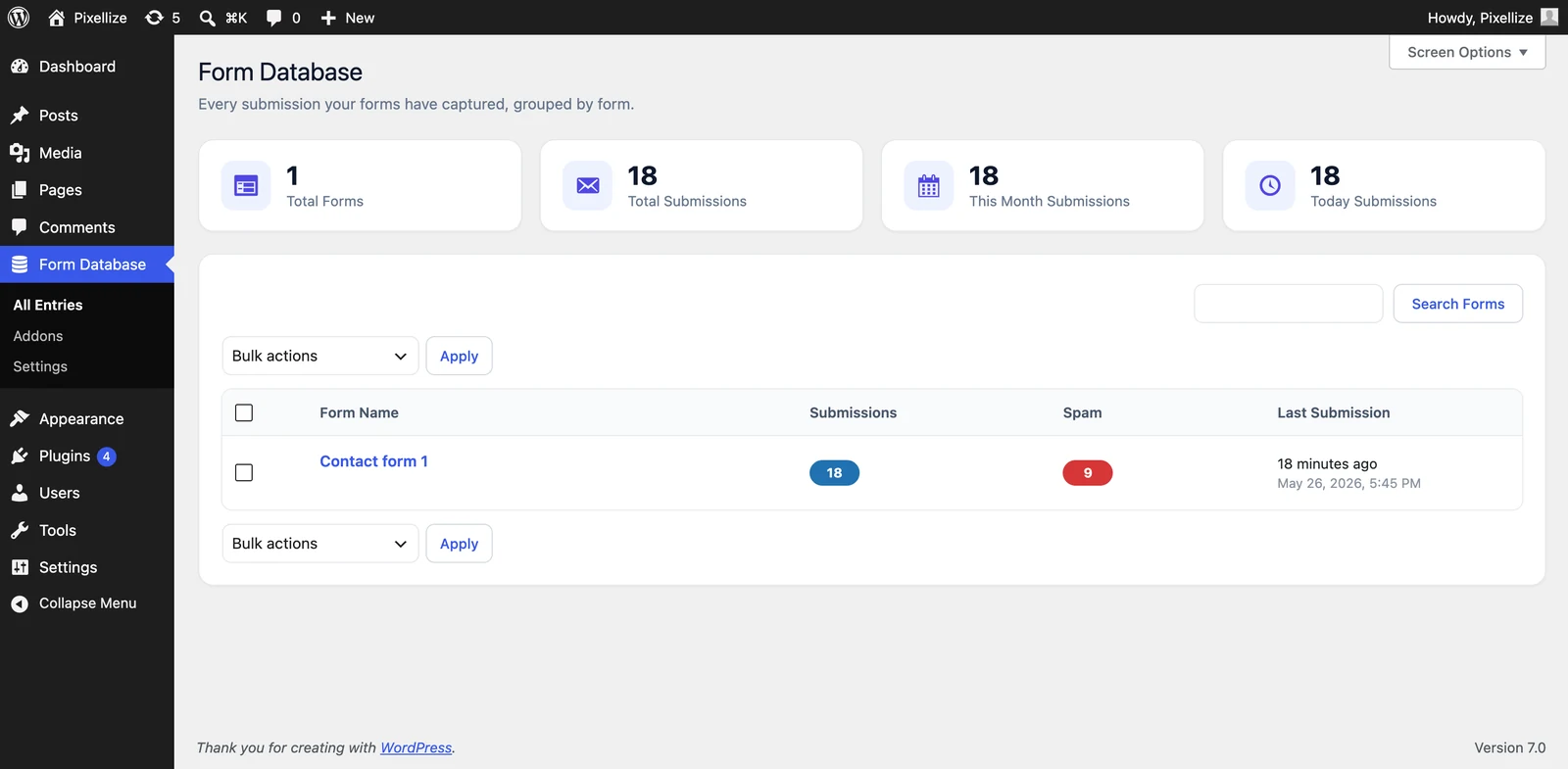
A multi-plugin database tool combines all of that into one admin screen. Pixellize Form Database (a free plugin on WordPress.org) takes this approach: it auto-detects Contact Form 7, WPForms, and Ninja Forms on activation, hooks into each one natively, and stores every submission in a single custom table you can browse from one dashboard.
The plugin hooks each form plugin at its native submission event:
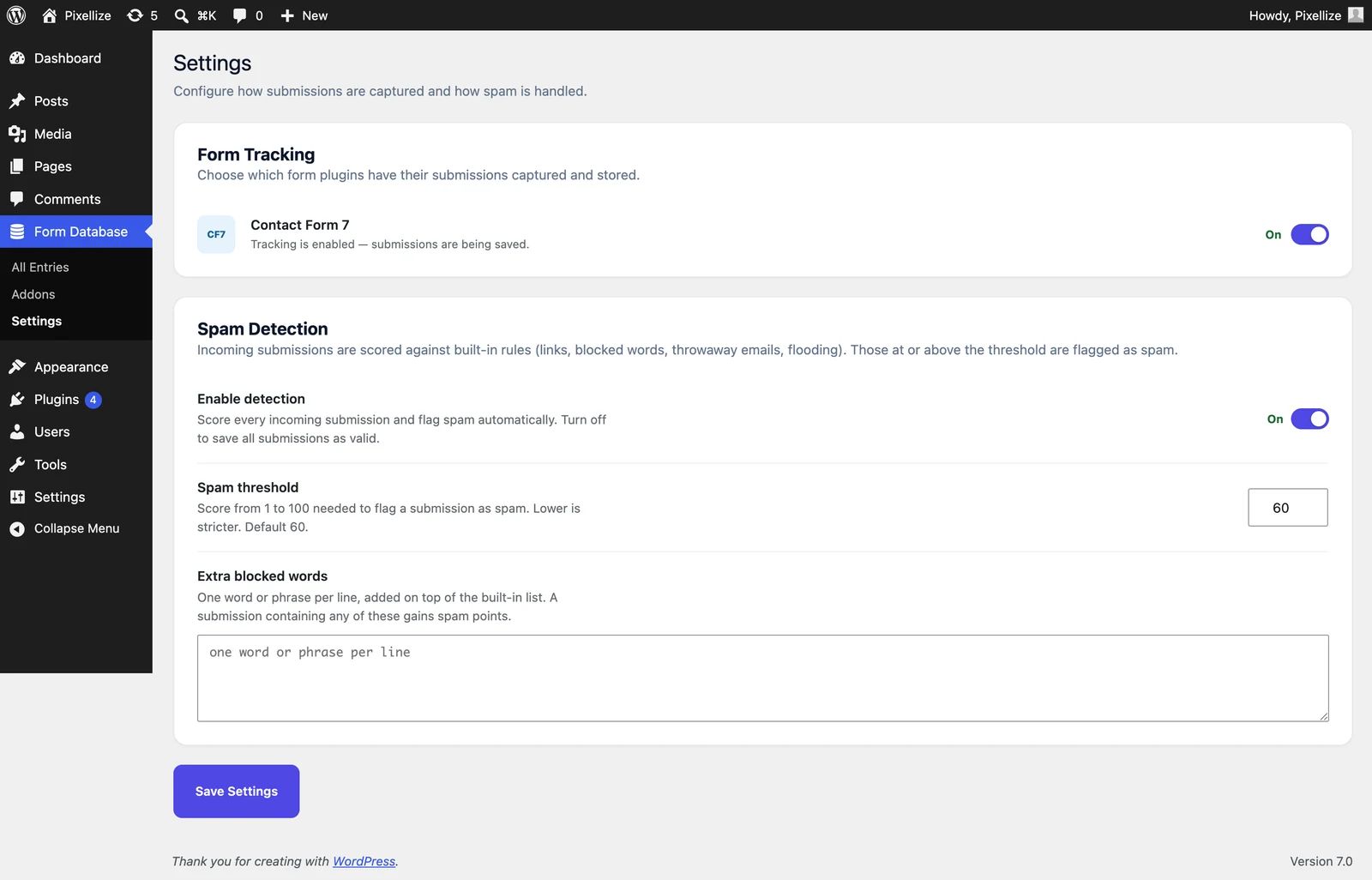
wpcf7_before_send_mail action, which fires after CF7 validates a submission and before it sends the notification email.wpforms_process_complete, available in both WPForms Lite (free) and WPForms Pro.ninja_forms_after_submission, fired after NF processes the entry, available in the free version.Each hook receives the full submission payload, which the plugin writes to its custom table along with metadata: timestamp, IP address, source form plugin, source form ID. No field mapping is required. Whatever fields the form has, the plugin stores. JSON for arrays and multi-value fields, plain text for single-value fields.
Contact Form 7 is the original WordPress form plugin, used on more than 15 million sites. To save contact form 7 submissions to database free, install Pixellize Form Database from the WordPress.org plugin directory and activate it. Tracking starts immediately for any new submission. No configuration step is required. The plugin detects every CF7 form on the site and adds them to the Form Database admin screen.
Each entry shows on a dedicated submissions table, with the native WordPress list-table experience: sort by date, search across fields, filter by month, bulk-delete. Clicking any entry opens a detailed view showing every field the visitor submitted, plus the IP, timestamp, and email-delivery status if known.
WPForms Lite is the free tier of one of the most popular form builders on WordPress. It does not save submissions to the database. Entries are visible only as emails delivered to the form admin. To unlock database storage in WPForms itself you need WPForms Pro, which starts at $49.50 per year for one site.
The free way to save wpforms lite submissions to database is to install a third-party plugin that hooks into WPForms’ submission event. Pixellize Form Database does exactly this via wpforms_process_complete, which fires on every successful WPForms submission regardless of whether you’re on Lite or Pro. Every field, every entry, captured. No paid upgrade needed.
Ninja Forms has a built-in submissions screen in its admin, but it is only available in the paid Ninja Forms version. The free version sends notifications and that is it. To save ninja forms entries to database without buying the paid version, the same Pixellize Form Database plugin handles Ninja Forms too via ninja_forms_after_submission. File uploads attached to Ninja Forms submissions are logged as cards on the entry detail screen, with thumbnails for images and document icons for PDFs.
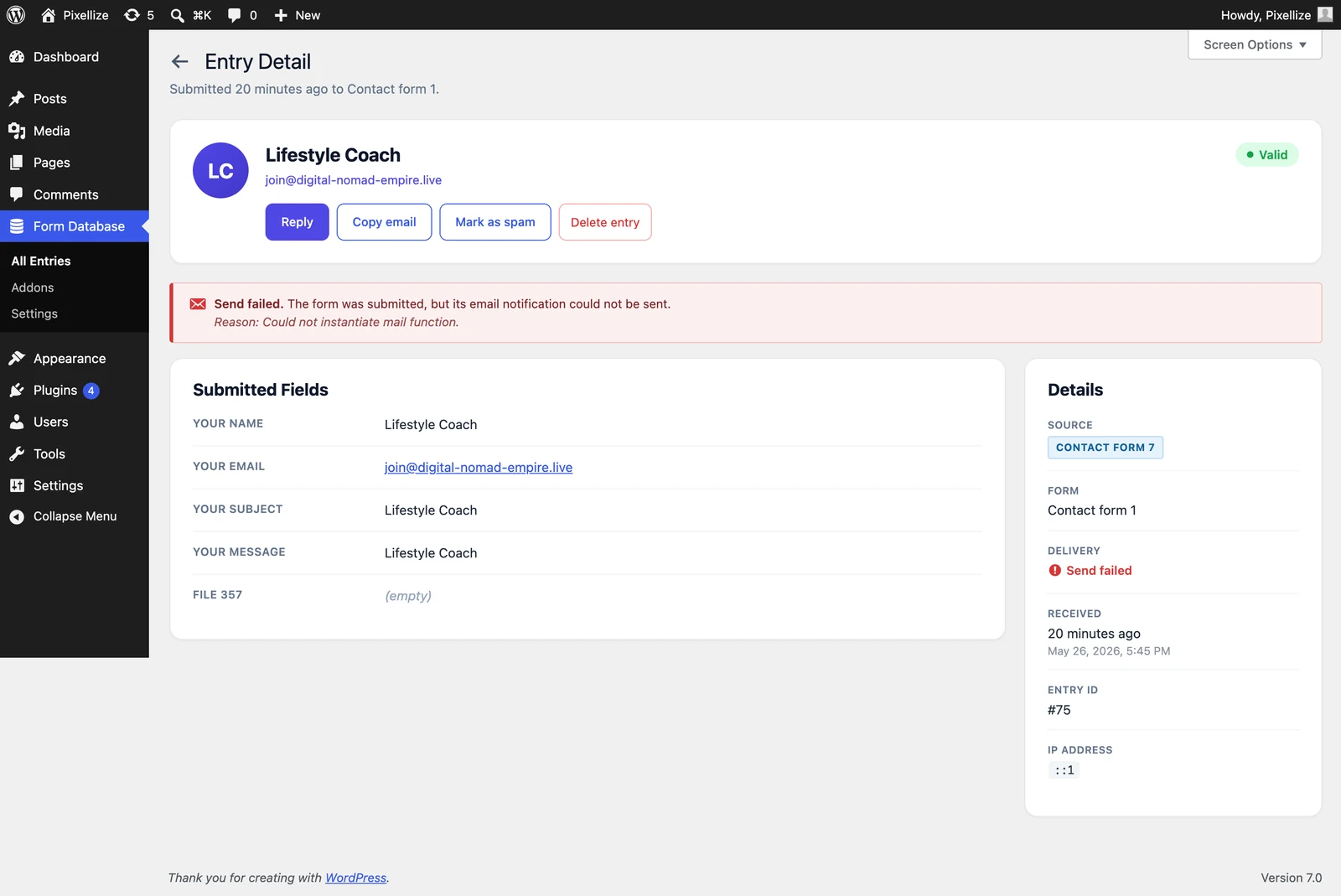
This is the most common scenario. A submission triggers wp_mail, wp_mail hands off to PHP’s mail function or to an SMTP service, and somewhere along that chain the email fails silently. The form returns its success message to the visitor, the visitor walks away, and the form admin has no record that anything happened. Pixellize Form Database captures the entry into its custom table BEFORE the email send fires, so even if the email never delivers, the entry is preserved.
The plugin also records the WordPress wp_mail_failed status per entry. If WordPress core knows the email bounced, the entry detail screen shows the exact failure reason (“SMTP connect() failed”, “Could not instantiate mail function”, “550 Mailbox not found”, and so on). That is something email-only sites never see.
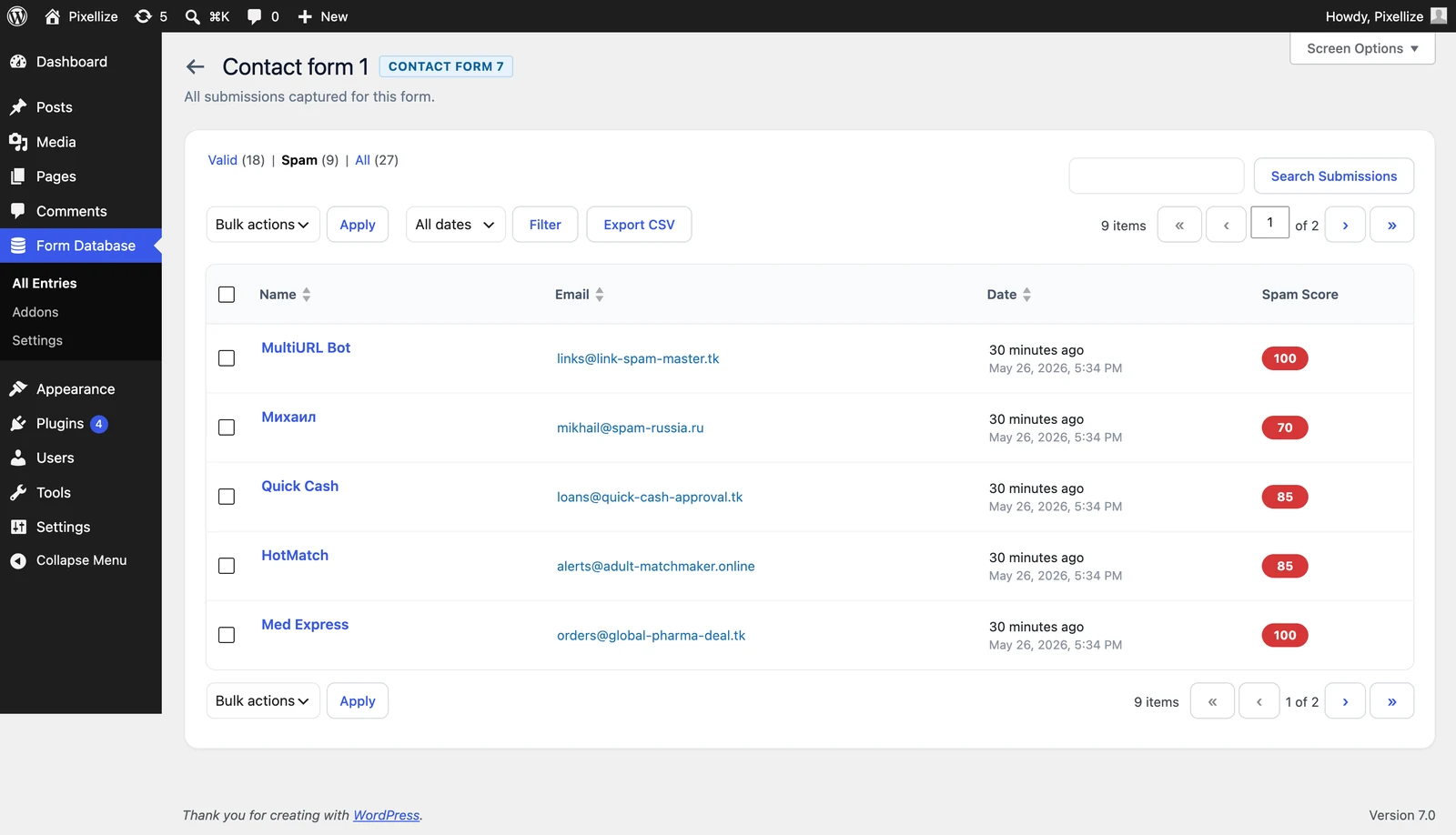
Most spam plugins (Akismet, Cleantalk) send submission content to a remote API for scoring, which is a privacy and GDPR consideration for European sites. Pixellize Form Database scores each submission offline against built-in rules: number of URLs in the body, throwaway email domains, blocked words you configure, IP addresses flooding the form, repeat senders.
The threshold is configurable (default 60). Entries above the threshold get tagged as Spam and moved into a Spam tab; valid entries stay in the Valid tab. Both are visible from the admin, and one-click “Mark as Spam” or “Not Spam” handles edge cases. No data leaves the site.
One of the most common reasons to save submissions to a database is reporting. Marketing wants “how many leads came in last month?” Sales wants a CSV of every entry from the last 30 days for a HubSpot import. Email cannot answer either question. A database can.
The plugin’s Export as CSV button respects the current search and date filter, so you can isolate a subset of entries (just one form, one month, just valid non-spam) and export only that. CSV columns include every submitted field plus metadata: submission date, IP, source form, source plugin, spam score, delivery status. The export sanitizes spreadsheet formula injection so opening the CSV in Excel does not trigger arbitrary cell execution.
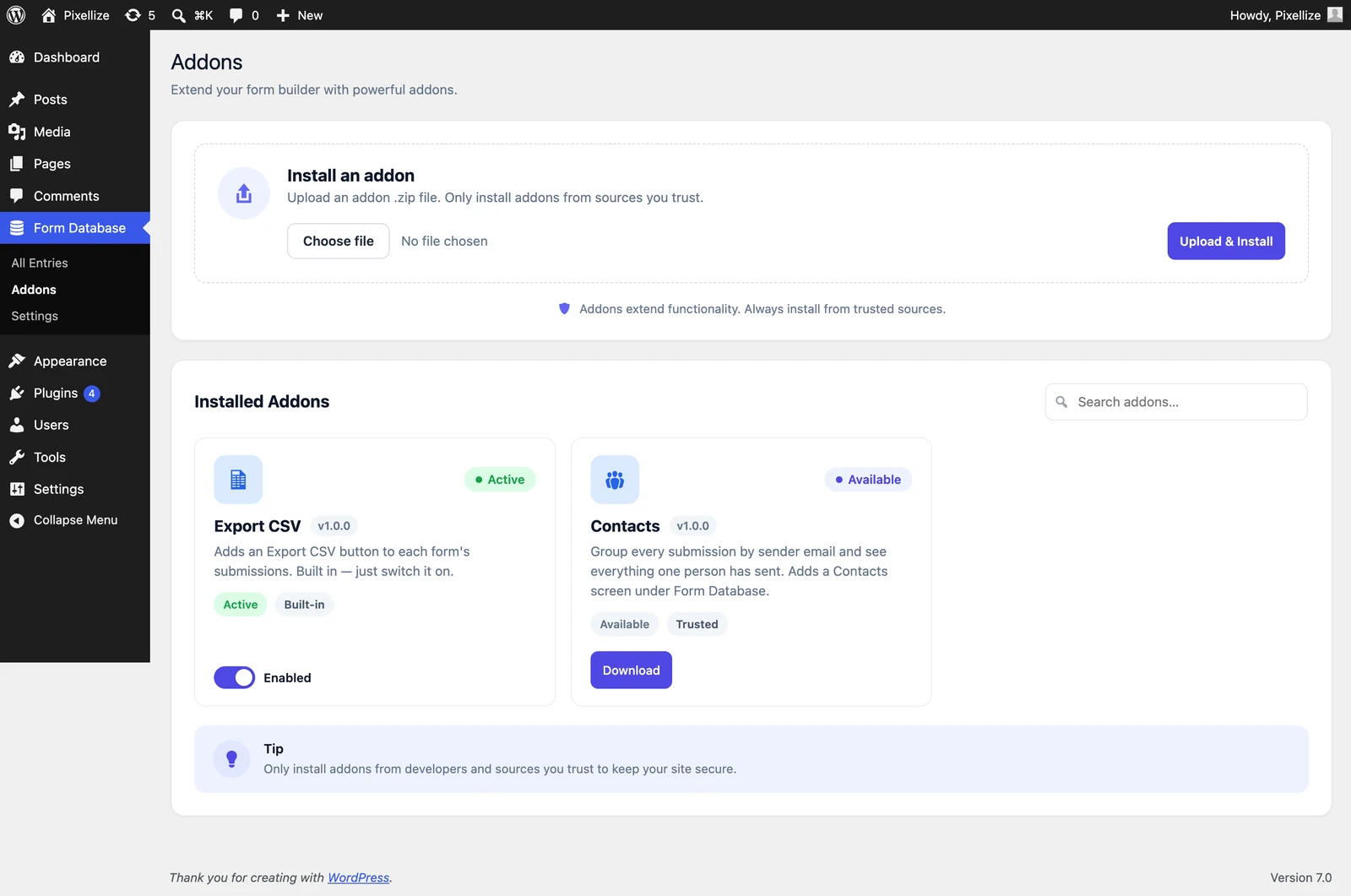
One feature that separates Pixellize Form Database from single-plugin database tools is the bundled People (Contacts) addon. It groups every submission by sender email across all three form plugins, so you can see at a glance every submission a specific person has made across your CF7 contact form, your WPForms newsletter signup, and your Ninja Forms quote request. Useful for GDPR data-access requests (one screen shows everything tied to one email), for sales prospecting (who is interacting most), and for support (full conversation history per person).
People comes as an addon you install from the Addons screen. The same screen lets you upload your own .zip-packaged addons, activate or deactivate them, and remove them when no longer needed. Addon files live outside the plugin folder so they survive plugin updates.
Honest scope matters. Pixellize Form Database does not:
These are deliberate scope choices, not missing features. The goal is a focused database tool that does one job well: capturing entries from the three most popular WordPress form plugins reliably and cleanly.
Three steps:
No API keys. No third-party accounts. No paid upgrade tier. The plugin is under 10 active installs as of May 2026 because it is brand new, not because it is complicated.
Saving WordPress form submissions to a database is not optional for a site that takes leads seriously. The cost of one missed submission, a customer who never got a response because the email bounced, easily exceeds the time it takes to install one free plugin. If your site uses Contact Form 7, WPForms, or Ninja Forms (or any combination of the three), give Pixellize Form Database a try. Knowing how to save contact form 7 wpforms and ninja forms submissions in one place is one of the quieter wins in WordPress site maintenance, alongside other habits like keeping plugins up to date and running periodic image and link audits.
Yes. The plugin hooks wpforms_process_complete, which fires in both WPForms Lite and WPForms Pro. You do not need a paid WPForms plan to get database storage when using this plugin.
No. Only submissions made after activation are stored. WordPress does not keep a record of past CF7, WPForms Lite, or Ninja Forms free submissions, so there is nothing for the plugin to backfill from.
The custom database table and all stored settings are removed on uninstall. Export anything you want to keep as CSV before deleting the plugin. Deactivation (without delete) keeps everything intact.
Yes. The Settings screen has a toggle per detected plugin. Turn off CF7 tracking and only WPForms + Ninja Forms entries get captured, for example.
Akismet and Cleantalk send submission data to remote servers for scoring, which has higher accuracy but worse privacy. Pixellize Form Database scores offline against local rules (links, blocked words, throwaway domains, IP flood patterns, repeat senders).
The hook fires only on form submission, not on every page load. A database write per submission adds milliseconds. There is no front-end CSS or JavaScript injected on regular pages.
The data stays on your WordPress site, which you already control. No third-party sharing. The People view groups by email, which makes data-access requests easy. Standard GDPR considerations still apply: have a privacy policy, document retention periods, only collect what you need.

Founder and CEO of Pixellize.io, building AI-powered web tools and digital products with a focus on user experience and automation. M.Sc. Zoology, working at the intersection of technology, data analytics, and life sciences.